Intermittent lock and clicking with TV Toslink input

Intermittent lock and clicking with TV Toslink input

I have recently changed from a two-box Rossini system to a three-box Vivaldi system, and the performance with streamed music is excellent.

However, I am having problems when connecting my television to the dCS DAC via Toslink. I can achieve satisfactory lip-sync by disabling the input buffer, but neither my Rossini nor the Vivaldi will maintain a reliable lock on the television’s optical signal. This results in intermittent clicks and brief losses of sound, making it impractical for watching television.

The same Toslink output works without any problems when connected to my Naim ND555, so the issue appears to relate to how the dCS units handle or lock onto the TV’s optical output.

Has anyone experienced something similar, or found a setting or practical solution that provides both reliable lock and acceptable lip-sync?

Many thanks.

kmslee

Some TVs have a “loose” implementation of their Toslink output which some DACs can’t handshake/keep stable, few threads if you search. Solution can be a super cheap DAC from Amazon or a reclocker/resyncer.

I am currently using my ND555 for television sound, & it handles the Samsung’s Toslink output perfectly.

However, if I could route the television reliably through the Vivaldi, I could potentially remove the ND555 & its two PS555 power supplies from the system. That would eliminate three boxes, two power leads & considerable rack and cable complexity.

I am therefore particularly interested in an exact current television model that is known to work reliably into dCS with the buffer disabled and the external Vivaldi Master Clock retained. A confirmed model would be much more useful than a general recommendation for a particular manufacturer.

Thank you.

Can’t help I use a full AV system, maybe a member on here can help with specifics. I know from other forums that LG OLED TVs from 2-5 years ago have poor spec Toslink out and problems with dCS units were mentioned in various posts. Google search is your friend.

This reclocker has been posted about as a solution

Thank you, Gus. This looks like a possible solution & is certainly worth a punt. I will speak with Elite tomorrow.

I am wondering whether having the Remedy configured to output 48 kHz, rather than the standard 96 kHz, would work better with the three-box Vivaldi system.

We seem to have a problem locking to the Toslink outputs of specifically Samsung and LG TVs (unfortunately for us the two most popular brands). In these cases a good workaround seems to be to use (M)aster Sync Mode (Universal Master Mode on Vivaldi) rather than (A)udio Sync Mode. So the theoretically incorrect mode seems to give the best experience in practice.

Thank you, Andrew. That is very helpful.

I had tried Master Sync Mode previously, before adding the Vivaldi Master Clock, but I had not appreciated that Universal Master Mode could be configured specifically for the TV input while leaving the normal external-clock arrangement in place for streamed music.

I have a spare 75-ohm BNC cable, so I will connect the DAC Word Clock Output to a spare Word Clock input on the Upsampler and try the Samsung Toslink feed again with Universal Master Mode and the buffer disabled.

I will report back on whether this cures the clicks and dropouts.

Many thanks.

Hopefully the solution suggested by Andrew works, otherwise Elite should advise always had great service from them. My feeling is 96 out should be OK but good that the option to have it changed to 48 is available.

this is the first time & have asked a question on the community. Thank you both for you prompt, thoughtful & helpful replies. :slightly_smiling_face:

Remedy on route. Mark was most helpful. I tried the master universal clock but that lost something but it does sort the locking problem & the lip sensor was modest & I am sure fixable. The remedy comes on the 31st.

I had the same problem with my Sony TV to my Rossini. The only fix I found was to use a Toslink/SPDIF reclocker- in my case the ifi SPDIF ipurifier, which unfortunately is no longer manufactured.

I did have a recurrence recently for a few days but it mysteriously seems to have resolved itself again.

Regards, Mike.

I have no problems on my oldish LG Oled to Vivaldi. Don’t use it very often though. Strange thing happened recently, I thought let’s try toslink strait from the fibre tv-box, worked but sounded much worse than going from that box with hdmi to the tv and then toslink out to the Vivaldi.

We have a similar problem with a Sky Max box. Prior sky boxes worked perfectly but the newer Max model simply won’t lock to Vivaldi upsampler. Our solution is to record the program we intend to watch. Always this works, no issues at all. Go back to the live tv feed and havoc.

The Wyred4sound Remedy arrived yesterday & has solved the locking problem immediately, happily there is no lip sync issue either so the TV into the Vivaldi upsampler has been sorted. Thank you all :slight_smile:

Hello all,

I’ve just come across this thread and thought I would add some insight, as I’ve seen this particular S/PDIF issue many times during my previous employment with another high-end audio manufacturer.

Generally speaking, TV manufacturers treat the optical audio output as a convenience feature rather than a precision digital-audio interface. They mostly design these outputs to work reliably with a very wide range of consumer audio products. As a result, the timing of the digital output can be, shall we say, less tightly controlled than we would expect from a dedicated high-end digital source, resulting in relatively high jitter or a clock that wanders more than expected.

A DAC has to recover its clock from the incoming S/PDIF signal using a PLL. Many consumer products use clock-recovery systems that are quite tolerant of variation in the incoming signal and will continue to track it even when the source clock is less than ideal.

Higher-precision audio products (such as ours) place much greater emphasis on rejecting incoming jitter. dCS systems are designed around very low-jitter clocking, so the clock-recovery system operates within tighter parameters rather than simply following variations in the incoming clock.

The advantage is better rejection of jitter from a good digital source. The trade-off is that an unusually unstable or marginal S/PDIF output from a TV can occasionally move outside the range that the receiver can comfortably track, resulting in loss of lock, clicks, pop’s or brief dropouts.

This does not necessarily mean that either product is “faulty”. It is simply an incompatibility between the quality or stability of the TV’s digital output and the tighter clocking requirements of the audio system.

This is also why inserting a reclocker can solve the problem (although it’s not guaranteed and can introduce its own issues). It accepts the less stable signal from the television and generates a cleaner, more stable S/PDIF signal for the DAC.

I will bring this up with our development department to see if we can make accommodations for the wondering clocks of TV’s. I can’t guarantee anything will be introduced, but I will certainly raise the question.

I hope this helps explain what’s happening.

Tom

Hi Tom. it is great to hear from you and this is a really useful contribution.

U expect you may be aware that this topic is perennial and, it seems to me, occurs several times annually. May I suggest that your post is tuned into an FAQ to join those reached via Only the Music?

I also think it ( or a shortened version) could be added to future user manuals, if even by inserting a slip?

Thank you Tom for both your interest & insights. The Wyred4Sound Remedy has solved the problem for me albeit with another box, or two if you include a separate LPS.

Hi Pete,

That is a very good idea! and very much the same direction I was thinking.

Here is a link to the new FAQ guide I just uploaded to our site. https://dcsaudio.zendesk.com/hc/en-gb/articles/29525167155740-TV-Optical-Audio-output-with-dCS-Understanding-the-connection

Hope it helps :slight_smile:

Tom

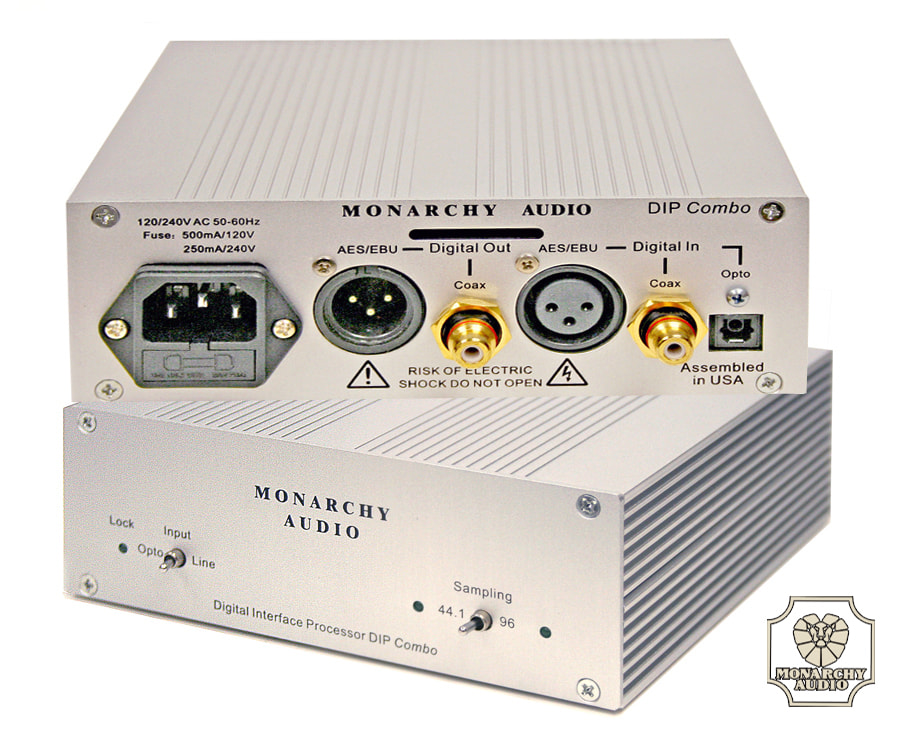
I’ve been using this device for 15 YEARS now. Even back then, I was having problems with the optical input. That’s when I came across the DIP Combo from Monachy Audio. There was also a smaller model, but this one does upsampling right away. And I’m still using it today, to my complete satisfaction. Unfortunately, the brand no longer exists… sorry.

The DIP Combo offers the following features in both the Classic(44.11() and Upsampled(96K) modes:

1: Boosted signal strength(to 5 times higher) this mitigates the deficiency in marny digital cables
2: Signal conditioning (itter redurction)
3: Ground isolatior"r (from hum and noise)
4: Forrnat change(from Opto to RCA; frorn co-axial to Balanceci, etc)
5: precision clocks (at 44.1 ancl 96Khz)

Then, please note that the precision clocks offer very irnporlant functions:

1: it allows the DAC to operate at higher accuracy. Ilence better sound. (the incorning clock from the trarrspotl is actually discarded)

2: it allows the user to choose, sometimes by listening, to see which sarnpling rate gives hirn better sound. While Upsamplir-rg has many advantages(especially in tire way of pulse respollse.

Great explanation Tom. If I remember correctly, back in the day, classic dCS products such as Elgar/Delius/Purcell used to have a setting/switchable PLL wide or narrow window.