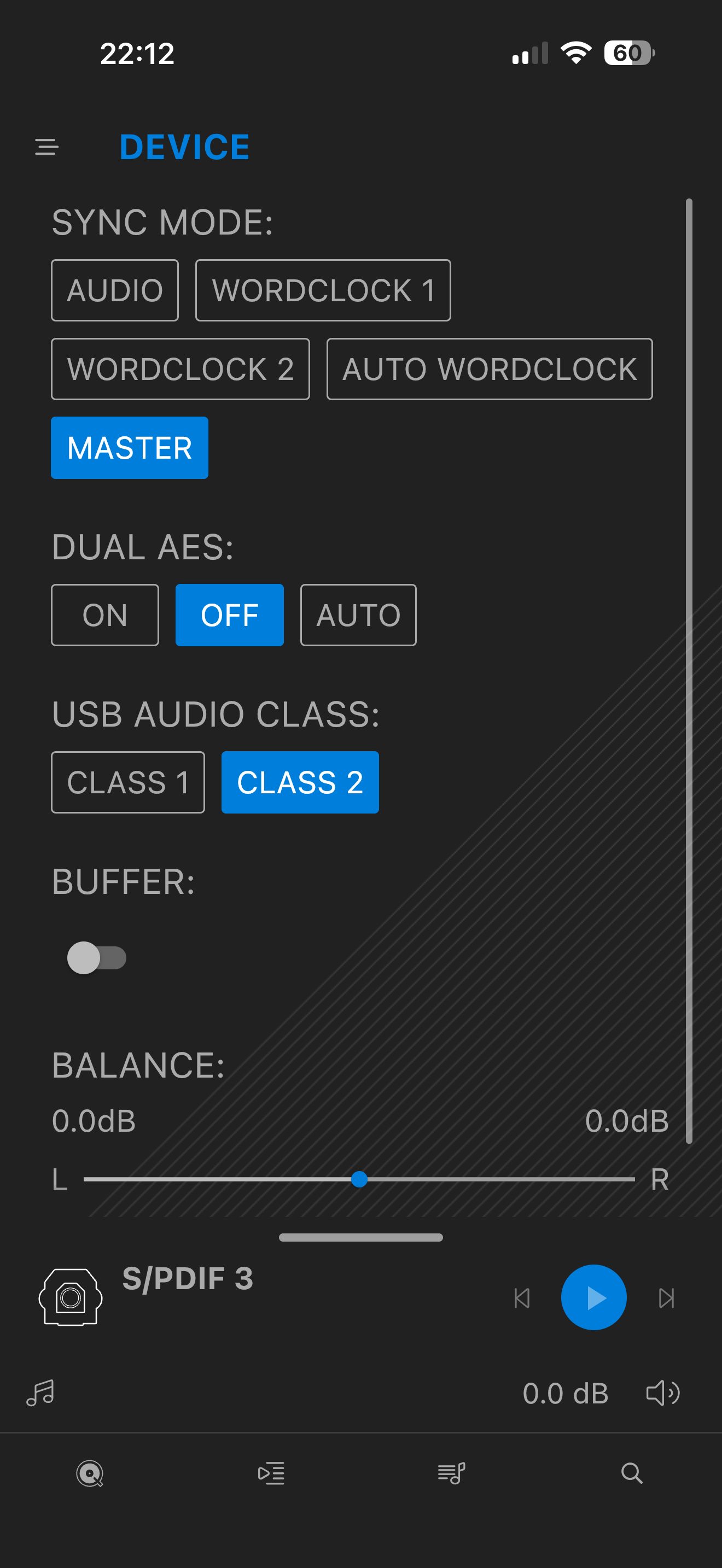
I am trying to connect my Samsung TV to the Bartók by a Toslink cable to SPIDF 3, but get a constant clicking, and the ‘Cog and A’ are flashing. I have read the post that states SYNC MODE should be set to ‘AUDIO’ and that should fix it, but it doesn’t.
I’m sure I must have an incorrect setting somewhere. Please can anyone assist?
UPDATE
Having a fiddle with the settings, a pop up on the front of the Bartók came up, “Folder Empty”. The screen went blank and the unit turned off. Unplugged from the wall, waited five minutes, Bartók lifeless!
There were previous reports with problems experienced with Samsung tvs and connection to DCs units. The clicking is because the dCS cannot get a stable lock to the Samsung. There is a way around this but I would need to refresh my memory. I think it uses another component as an interface between the two.
The Bartók going “ dead” I have not come across before and it sounds serious and you may need to refer to @Phil at support.
The Bartók is back on. (Thank God!) It really didn’t like the SPIDF 3 connection. I had read a previous post where someone else had the same issue, but managed to cure it.
That bloody Samsung TV has been a Pain since we’ve had it! Constantly states there’s no HDMI plugged in to the ARC port, when there is!! Wish the bloody thing would blow up, then I could get a different brand.
If you can remember the workaround Pete please let me know. Cheers👍
Some TVs are a bit lax with jitter on their audio outputs - “A” should be correct for the sync type but if the audio drifts too much then the DAC will try to resync and will mute whilst doing so - I have the same issue with all my LG TVs at home and it is usually LG TVs that we see this with but I would suggest trying setting the sync type to “M” (Master) … it isn’t the “correct” setting but the way that “M” sync works masks over the jitter issues with TVs as far as we have seen.
This would suggest you selected the USB “A” input (where you would usually plug in a USB thumbdrive) and it was reporting that there were no files available … it’s a very rarely used function but it means that if someone brings a USB stick over then you can play from it without the Mosaic App.
I can’t see a way that this is related to the above - when you plug the Bartok back in do you have any lights on on the Bartok at all? What happens if you press and hold the front panel power button for a few seconds?
David, I think my memory was pretty much along the lines of what @meltemi mentioned. That is some kind of resampler between TV and dCS.
I do not have sufficient knowledge of this area but perhaps there may be something cheaper than a Muted MC3 that would suffice? The idea is that the device’s input will accept the jittery tv but it then would provide a usable output to the dCS unit.
For sound quality reasons I think that the dCS toslink requires an input of tighter spec. than offered by some tvs such as LG or, seemingly, Samsung.
I have tried what @Phil suggested. Switching the Sync Mode to ‘Master’, not ‘Audio’. Although an incorrect setting it does work! The lip sync is way off, so I have turned the Buffer off. Now works perfectly.
I just though that you may be interested in this thread from years ago about the same issue with LG ( and later in the thread Samsung) tvs. The fix seems to have been using a converter between the two as I suggested earlier.
Been busy this morning testing various scenarios on the above issue.
Just to confirm that I have a Samsung Smart TV from 2019, (QE55Q90RATXXU) Which has been a pain in the butt since we’ve had it. If you plug an HDMI in to port No 3 (eARC) we get a pop up stating “Please plug an HDMI in to the eARC”. It doesn’t appear to know what’s plugged in and what’s not. Anyway, back to the present issue.
Connecting a Toslink cable from Samsung TV to Bartók SPIDF 3, creates a constant clicking from the Bartók. with Sync Mode set to ‘Audio’. @Phil suggestion has worked. Switching from ‘Audio’ to ‘Master’. with Buffer switched off.
I tested our Sony Bravia TV which is about 10 years old. When connected to the Bartók it worked perfectly with Sync Mode set to ‘Audio’. I must add that it also worked with it set to ‘Master’. In both tests the Buffer needs to be switched off, otherwise the lip sync is way off.
It would be interesting to know how SPIDF 3 works with other brands of TV. @Phil mentions above that he has LG TVs and has experienced some issues.
I can now listen to Floyds ‘Pulse’ through my lovely system! Cheers Phil
eARC is based on HDMI 2.1 and requires cables that support it. These are apparently labelled “Ultra High Speed” (gotta love HDMI’s naming conventions). So it might just be that the cable you are using is the source of the problem.