I bought a cable to connect both units, set RS232 on Text Mode on both. This should theoretically make the clock turn on once I turn on the Vivaldi One, or am I wrong? This doesn’t happen.
No, it will not unfortunately. The Vivaldi Clock was never part of the 3-Way RS232 control mechanism with the rest of the Vivaldi stack - Transport, DAC, Upsampler. The Vivaldi Clock has to be powered on manually separately.
Oh. too bad, thx.
It was a 10$ cable, not a big issue anyways.
The clock turns on and goes to standby in my system. Dac, upsampler and clock. You can do it using the remote or mosaic. Is it different then to the vivaldi one?
How does it work in my system
There’s no way the clock can get controlled directly by Mosaic, as it doesn’t have a connection to the network.
Either it detects no device is looking for a clock signal or it gets triggered through the RS232 interface.
Haven’t really played with the remote one single time, preferring the phone, but I’ll give it a try. Is the clock able to receive commands from it?
As you say Andrea, the Vivaldi Clock has no internet connection so can’t be configured or controlled by Mosaic. No dCS unit can be turned on from off by the remote, only from sleep. Also, it is an output-only device, there is no feedback loop in the clock lines, so it has no idea if any devices are receiving the signals it is sending. I believe the clock can be put to sleep and awakened via the remote, but not having one here I’m unable to verify that I’m afraid.
Please note that temperature stability is important for the clock so putting it to sleep is preferable to turning it off except for extended periods.
I always keep both One and clock at sleep, never turn them off.
As said the vivaldi clock can be put on and then put back into standby with the remote and mosaic ( i am sure by mosaic as well). Not turned on if fully off, they need to be left in standby as this is now I leave mine.
Sometimes the clock fails to wake up when the other 2 do, but if you just do it again it catches up and all 3 go fully live. Can’t go try it with mosaic at the moment as i don’t have my upsampler, but with the upsampler out the system the clock still comes out of standby and goes back to standby using the remote.
In fact, the Vivaldi Clock accepts pretty much the same commands via its RS232 interface as the Rossini Clock.
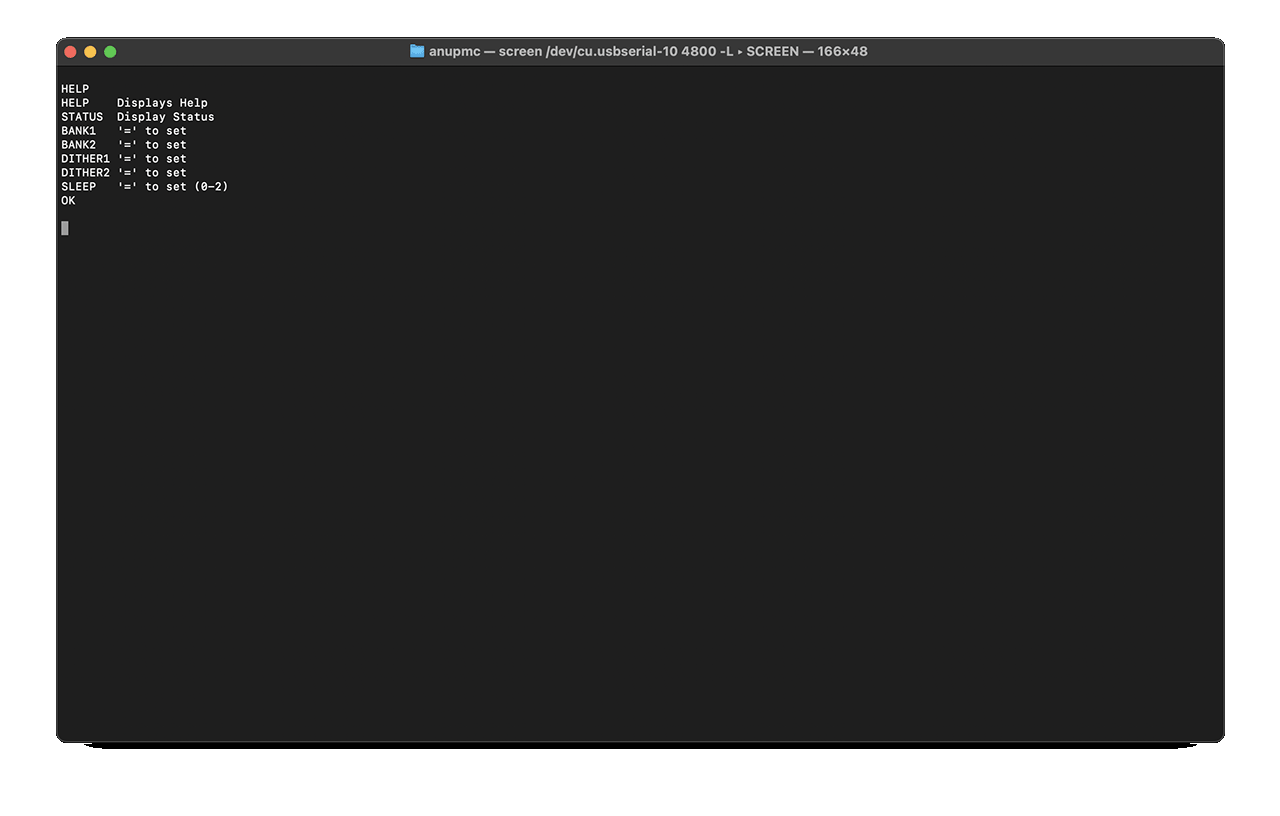
With the Rossini/Bartok-Rossini Clock RS232 pairing, when the R/B are put into sleep, they issue a “Sleep = 1" out of their RS232 ports, which puts the Rossini Clock into sleep jointly, and when woken, a “Sleep = 0"
In your case, did you use the dCS Vivaldi 3-way RS232 cable, and did you connect what was meant for the Vivaldi Transport to the Vivaldi Clock? (Which is probably how it’s working I guess).
I’m guessing this is probably because the Upsampler is also issuing other RS232 Commands out that the Vivaldi Clock doesn’t understand.
The other thing to keep in mind is that the R/B-Rossini Clock RS232 ports operate at a baud rate of 115,200kbps. However the Vivaldi system RS232s operate at a much lower 4800kps.
I’m really not sure about the Vivaldi One. Quite possibly it does not behave the same as the Vivaldi Upsampler (which is the primary on the RS232 control in the Vivaldi stack). 
1 Like
I don’t even have the RS232 cable even connected to any boxes at the moment and the remote turns both the vivaldi dac and clock from standby to on, and then from on back to standby.
I also don’t use the spare the transport connection at all and never had as I don’t have a vivaldi transport
Ahh!! You meant the IR Remote.
Then your statement above about Mosaic being able to turn them all on is incorrect. Mosaic can only turn on components that are linked to the Upsampler via the RS232 link cable.
I can’t try the mosaic at the moas i don’t have my upsampler, but i think it turned then all on and off as stated as I haven’t always used the remote and don’t remember having to turn the clock on by the button every time
You’re remembering wrongly Dunc, there’s no way Mosaic can turn on your Vivaldi Clock without an RS232 connection to it.
Agree with Anup about Mosaic - for me it only controls the upsampler and DAC
I need to try the plank remote again. The last time I tried it did not turn all three on
1 Like
I just gave a quick try using the dCS mammoth remote, and that does indeed wake and put to sleep both devices simultaneously. Putting the Vivaldi One to sleep using its own button, the Vivaldi Clock shows no reaction.
As of the Vivaldi One’s manual, when in Binary Mode the baud rate is 4800, when in text mode it’s 57600. No idea about the Clock, its manual doesn’t specify the baud rate.
1 Like
As I said i can’t remember 100% and can’t try right now as no upsampler. But I 100% know it works from the remote.
I have never connect the spare transport plug to the clock, and with my luck properly not a good idea for me to try it. Lol
Well, I just tried it out.
Disconnected the 3-Way RS232 cable from my Vivaldi Transport and plugged it into the Vivaldi Clock. Attempted to wake the system up from Mosaic. No joy. The Upsampler and DAC turned on, but the Clock remained asleep.
So, even if the Baud rates were the same, it wouldn’t work (interesting though that the Vivaldi One has it at 57,600bps. The Vivaldi stack is definitely at 4,800bps for both text and binary).
Hi Andrea,
As a fellow VOne Apex owner I am curious about the difference you heard with the Vivaldi Clock versus not.
I’m asking because I have a Rossini Clock with which I couldn’t hear a difference with the VOne. Though that same clock was rather superb and quite improved the SQ with my Rossini Apex! Hence asking about your own experience with the V Clock paired with the VOne.
Thank you for your indulgence. Cheers
As some other already stated, it’s much easier to perceive the difference when you remove it after having used it for a while than when you add it.
It’s far from being the sort of leap I perceived migrating from the Bartók Apex to the Vivaldi One alone, it’s not what one could call night and day, but what I feel is an improvement on perceived details and spaciousness, together with a touch more body, or more “analogue-ness” if we want to call it like this. It all depends on how your loudspeakers/heapdhones setup is sensitive on such changes as well. My Zähl HM1 + Silver-upgraded Immanis headphones system is literally a sound microscope: it doesn’t miss any change in the chain. A more forgiving setup could reduce such differences.
I can imagine the reason behind the Rossini Clock not making much of a difference may be tied to the fact that the Vivaldi One’s implementation is already good enough as it is, and something better is needed to really get noticeable. Even if dCS itself labels the Rossini Clock as a viable alternative to the Vivaldi Clock for “easier systems” in the user manual.
FWIW, in my experience any of our Master Clocks will make a sonic improvement when used with any of our DACs, but the magnitude of the improvement increases as you move up the clock range. It’s the number of clock outputs (2 on Lina, 3 on Rossini and 8 on Vivaldi) that limit their use together with products from higher ranges, not their performance.