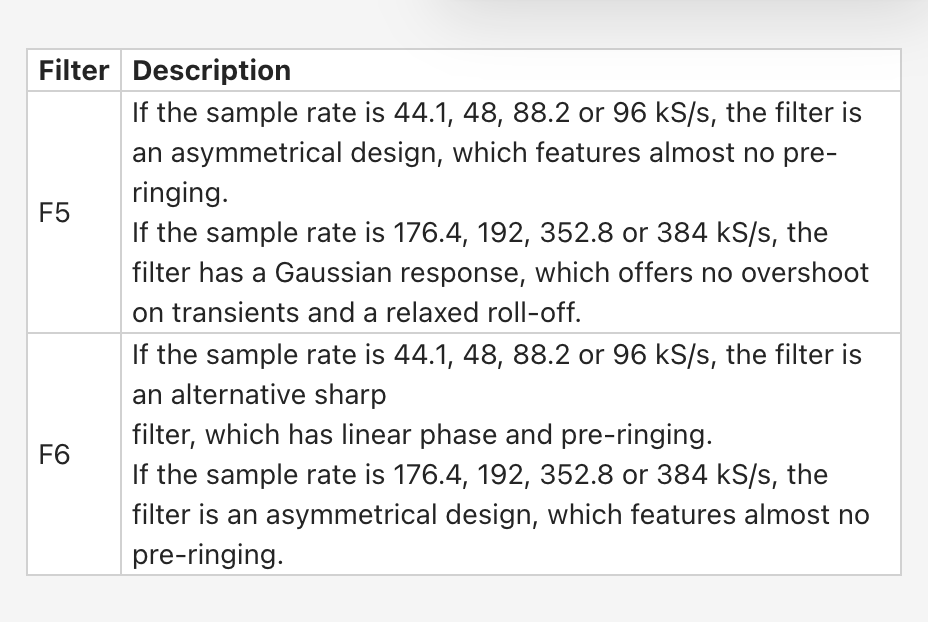
I’m a bit confused with how my Varese operates when it comes to upsampling. There doesn’t seem to be any setting in the Mosaic Actus app to engage upsampling, but the “measured” settings have Filter 6 engaged for 48 kHz data while the operating manual says that filter isn’t available for 48 kHz files (which suggests the files are being upsampled to 192 or 384, where Filter 6 is available).
On the other hand, if everything is automatically upsampled, then what’s the point of having a different Filter 5 for 44 kHz files than the Filter 5 that’s available for other files (if everything is upsampled, there would be no way to access the different Filter 5 for CD-resolution files).
Craig, similar to the Bartok/Rossini/Lina, Upsampling on the Varèse is always active. Your only choice with respect to Upsampling is whether PCM inputs stay in the PCM domain or gets converted to a DSD rates of your choice.
The Filters choices apply to the incoming digital sources (via any of the input interfaces), not on the internally Upsampled streams.
Good question on the signal path presets and what happens when the source data-rate is not applicable to the filter selection in the preset
In the case of the “Measured” preset, even with a 48k source, the signal path shows F6 selected even though the manual suggests it’s not available for 48K sources.
OK, I’ve got to the bottom of this and it is a simple error in the documentation. F5 and F6 are indeed available at 48, 88.2, and 96 kS/s, with profiles similar to those at 44.1 kS/s:
Please note that changing the filter settings in a preset (i.e. creating a Custom preset) must be done for each sample rate individually (similar to V/R/B), and must therefore be done while a file of that sample rate is playing. That is unclear from the documentation and will also be rectified.