I recently ran a USB cable from a Windows laptop to a Bartók streamer so I could use its DAC to play the sound in streaming videos, teevee, etc. The first time I hooked it up, the PC recognized the Bartók as a sound output device immediately, and everything worked fine. As of today, the Bartók no longer appears as a sound output device. I checked with a different cable and got the same result. Other sound outputs are fine. I suspect a Windows update yesterday may have snuffed the Bartok driver (if that’s how it worked). Any help with this problem would be appreciated.

Hmm…tried it, but no result. It was set on USB2, changed it to USB1, then back again.
Also tried rebooting the computer and the DAC. And tried a long hold on the mute button, as the manual advised.
The Windows update may have removed or disabled the Bartók USB driver. Try this:
-
Reconnect it and check Device Manager → Sound devices for “Bartók” or “USB Audio Device.”
-
If missing, reinstall the dCS driver or let Windows reinstall it by unplugging/replugging.
-
Also check Sound Settings → More sound options - it might just be disabled.
A reboot with the Bartók connected often fixes it.
The generic Windows USB Class 2.0 driver should work with Windows 10 or later. The dCS specific ASIO driver was only needed for Windows 7 and earlier.
A small correction. It was required for Win XP and earlier. Incidentally the dCS specific driver for USB 2 has now been removed from the Only the Music website.
Thanks Pete, my memory is good but short!
All,
Thanks for the continuing attention to this matter. It’s frustrating because when I first wired it up, it worked immediately.
- Reconnect it and check Device Manager → Sound devices for “Bartók” or “USB Audio Device.
Under “Device Manager I have these options:
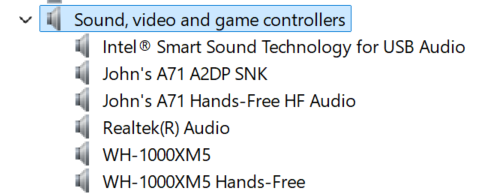
The Bartok doesn’t show up. Don’t know where to find the dCS driver; the link mentioned in the manual is dead.
- Also check Sound Settings → More sound options - it might just be disabled.
A reboot with the Bartók connected often fixes it.
That didn’t work.
Just for completeness’ sake, I connected the computer to the USB Type 1 port (USB2), and a Bartok driver didn’t show up on the computer. The Android dCS app doesn’t let me select USB2 as an output, nor does the menu on the Bartok.
John
No, you definitely want input USB 1 (the square USB-B receptacle) and not USB 2 (the flat USB-A one). USB 1 should be set to Class 2. Per the manual, toggling back-and-forth between Class 1 and 2 is an easy way to reset the USB interface.
I suggest you reboot the PC and toggle the USB class one more time to reset the interface. If that doesn’t work we’ll have to call in the heavy artillery.
Hi All,
Just to clear this up…
USB Class 2 Audio support was introduced into the OS supplied driver in the Windows 10 “Creators” update in May 2017.
As Windows 10 forces that you install updates (unless you specifically disable it by messing with the registry) then anything with Windows 10 or 11 will be able to support Class 2 USB Audio playback but anything prior to that (8.1, 8.0, 7, XP etc) would need a driver to support Class 2 USB audio playback.
I hope that helps.
P