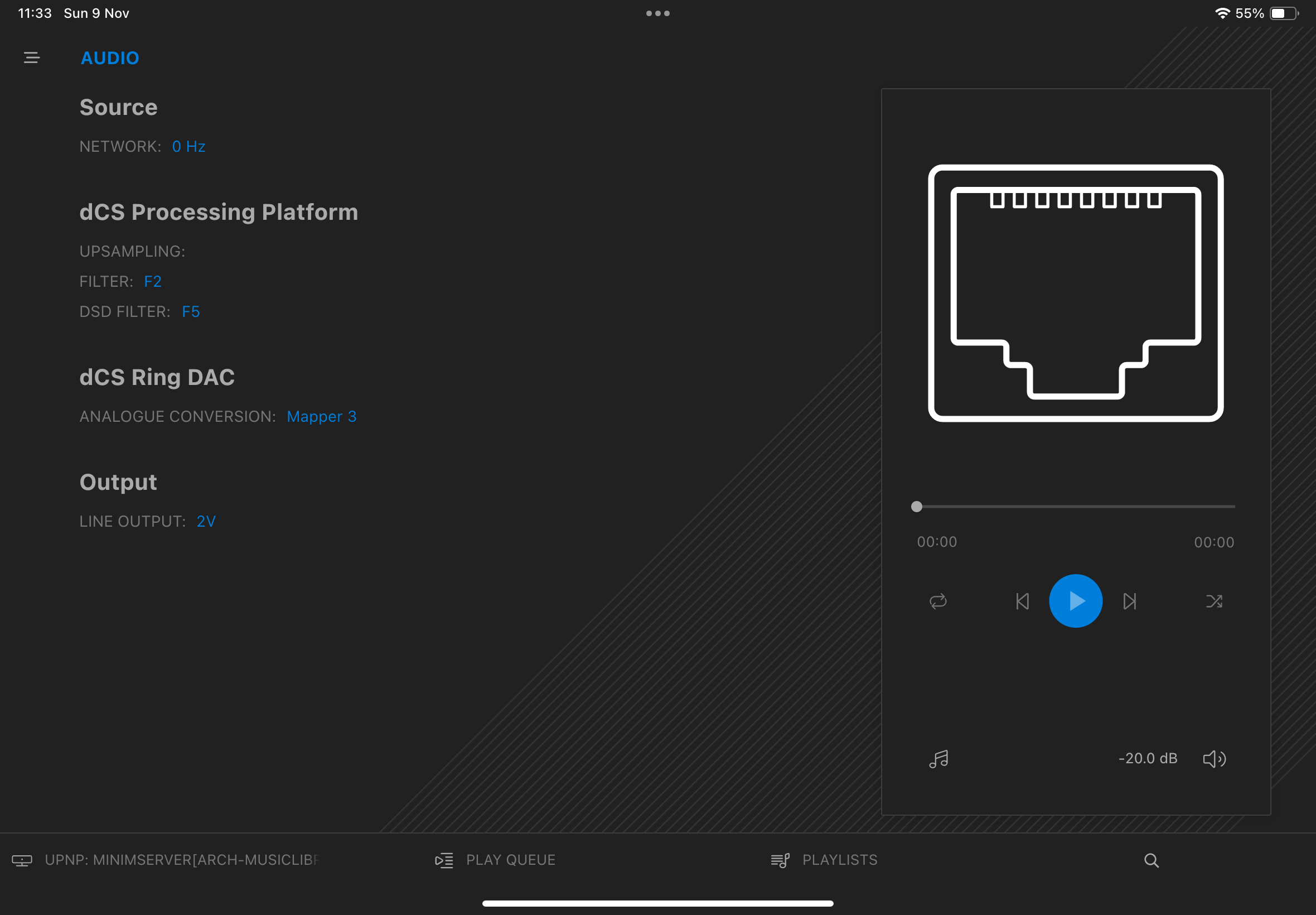
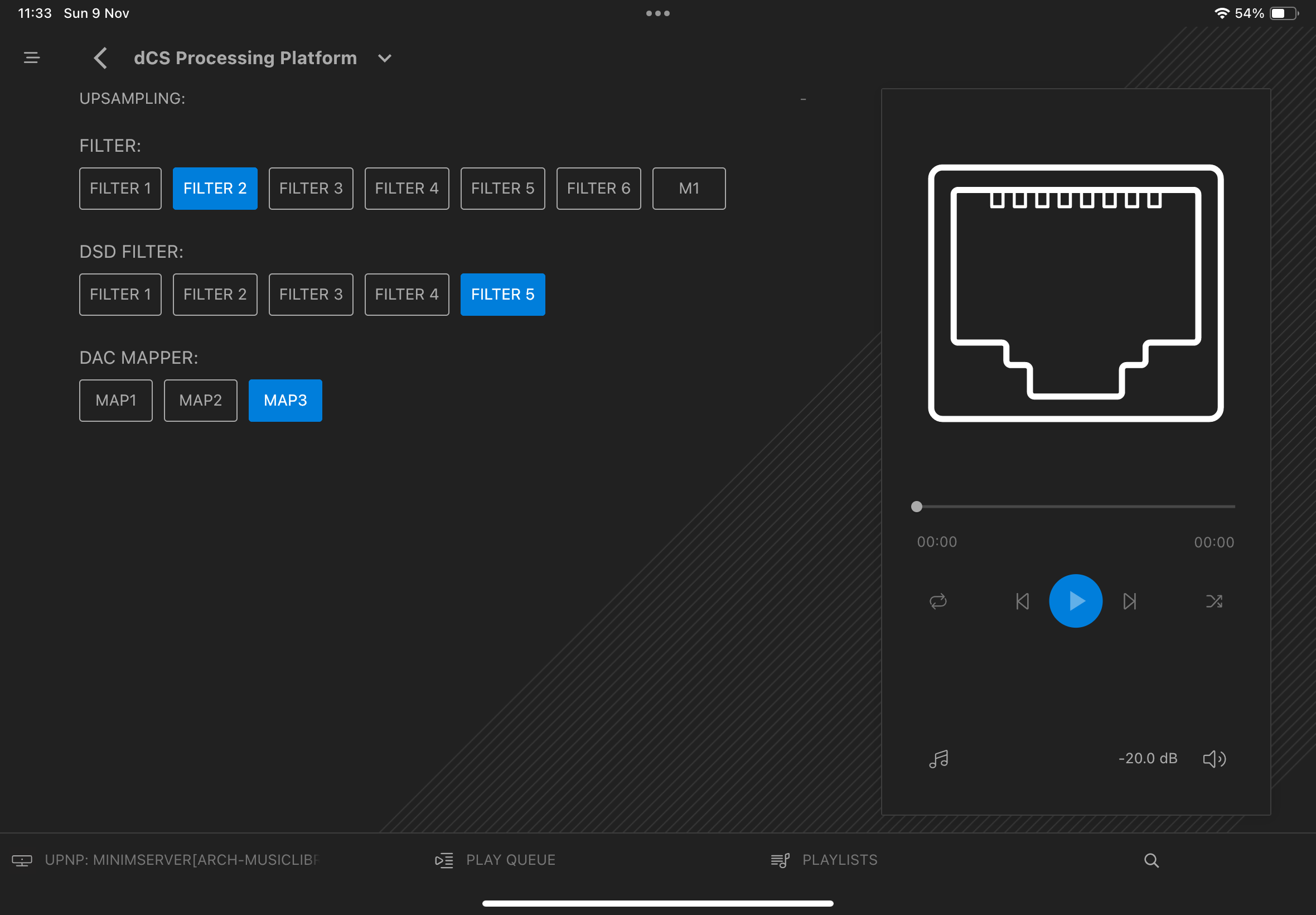
Just in the last few days I’ve noticed that the upsampling setting is not showing in Mosaic after powering my 5 year old Bartok off and on (there is nothing shown next to “UPSAMPLING:” on the screen). The circuit breaker for the ring main was tripped by something else at the beginning of last week but the Bartok was powered off at the time and was definitely not exhibiting the problem in the first few days after the trip and I haven’t changed anything recently. The Bartok still plays and behaves normally and the front panel shows upsampling to be set to DXD.
By powering off I mean holding the power button down until the display shows Powering Off which I normally do after every listening session.
I have also tried powering off and on via the switch at the back and the result has been the same: upsampling shows blank in Mosaic and can’t be set there.
The upsampling option can be changed via the Bartok front panel and once it is changed there it appears correctly in Mosaic and can then be managed in Mosaic as usual. I tried setting upsampling to DSDx2, confirmed that it was showing as such in Mosaic and on the front panel, and then powered off and on again. Upsampling was again showing as blank in Mosaic and as DXD on the front panel.
It would appear that the upsampling setting is not being retained at power off.
Version Info:
App Version: 1.4.4 (161)
Front Panel Version: 2.01
Control Board Version: 2.01
Network Board Version: 1.4.4 (527)
iPad Air with iPadOS Version 18.6.2
There are no other apparent issues but my concern is that this might be indicative of something beginning to fail.
Some clarification may help. Are you saying that opening the control hamburger menu in Mosaic shows no processing platform for upsampling or that if opened there is no DXD option? A screenshot might help. However if the latter this is unfortunately the case as v. 1.4.4 has mistakenly missed a DXD choice. At least insofar as Vivaldi is concerned and I imagine Bartok to produce the same result.
Incidentally check you iOS version as we are now up to v. 26.1. if your Air is within the period supported.
Thank you for your reply Pete and please see the 2 screenshots above. In the first please note the space to the right of “UPSAMPLING:” under “dCS Processing Platform” where the currently selected upsampling option should be displayed and in the second the lack of buttons under “UPSAMPLING:” where buttons for “DXD”, “DSD” and “DSDx2” would usually be displayed. As mentioned previously each of those upsampling options can be selected from the front panel on the Bartok and doing so restores both screens to their normal state.
Were you suggesting that this might be a known error in 1.4.4 or is the missing DXD option that you referred to something different or Vivaldi specific?
Thanks for the steer on iPadOS 26. My iPad is compatible and I do have update notifications switched on but nothing had come through. I have upgraded and as expected that was not the issue.
Couldn’t reproduce on my Bartok.
After a fresh reboot of the Bartok, the upsampling settings are available on Mosaic running on a iPhone with iOS26…
Using exact same versions as you @dwiggins88…
I have Vivaldi and the Mosiac 1.4.4 app will show what is available for it. As Bartok has some different attributes I cannot reproduce what you are experiencing. My thought is that as dCS units cannot upsample DSD, I am wondering if whether ensuring that PCM formats are selected for input may reintroduce the upsample rate data that you are missing. It may not show being redundant for incoming DSD.
It is just an idea so let me know if this works. Otherwise we will need further advice from dCS support.
Interesting problem. Have you tried deleting the copy of Mosaic on your iPad and re-installing it, or trying Mosaic on a different platform like an iPhone perhaps?
The issue just seems more like app/front-end problem than anything actually wrong with your Bartok
Thank you all for the suggestions. The issue manifests in the same way on my iPhone 16 and on my MacBook Pro M3. I have now deleted Mosaic from my iPad, restarted it, and reloaded Mosaic but the issue remains the same.
I have also again turned the Bartok off via the switch at the back and left it off for an extended period but on powering back on the issue remains.
I suspect the issue is with my Bartok and will need the assistance of dCS Support to resolve.
If you change the Upsampling type using the front panel display on the Bartok (front panel “Menu” → “Unit Settings” → “Upsampling”) and power off the Bartok at the rear panel switch or wall outlet then does it retain the upsampling setting that you set?
Can you fully close the Mosaic App, do a Factory Reset on your Bartok (front panel “Menu” → “Config” → “Factory Reset”) and then re-open the Mosaic app - is the Upsampling option now available?
If that doesn’t get you sorted then please drop me an email at [email protected] and we’ll pick this up with you.