Switching inputs back and forth from Network to SPDIF

Programmatic input selection on Rossini APEX — is it possible via RS232 or network API?

Setup: Rossini APEX DAC with Vivaldi Master Clock. Two sources: Roon via the network input, and a Smyth Realiser A16 processor on S/PDIF 1 (Audio sync, since the A16 has no word clock input).

When Roon starts a network stream, the Rossini switches itself to the network input — great. But when I switch back to the A16 source, I have to open Mosaic and manually select S/PDIF 1. I’d like to automate that return trip (e.g., a small script watching Roon zone events that tells the Rossini to select S/PDIF 1). The Rossini’s RS232 ports are currently unused, so a serial solution is fully available if it works.

Two specific questions:

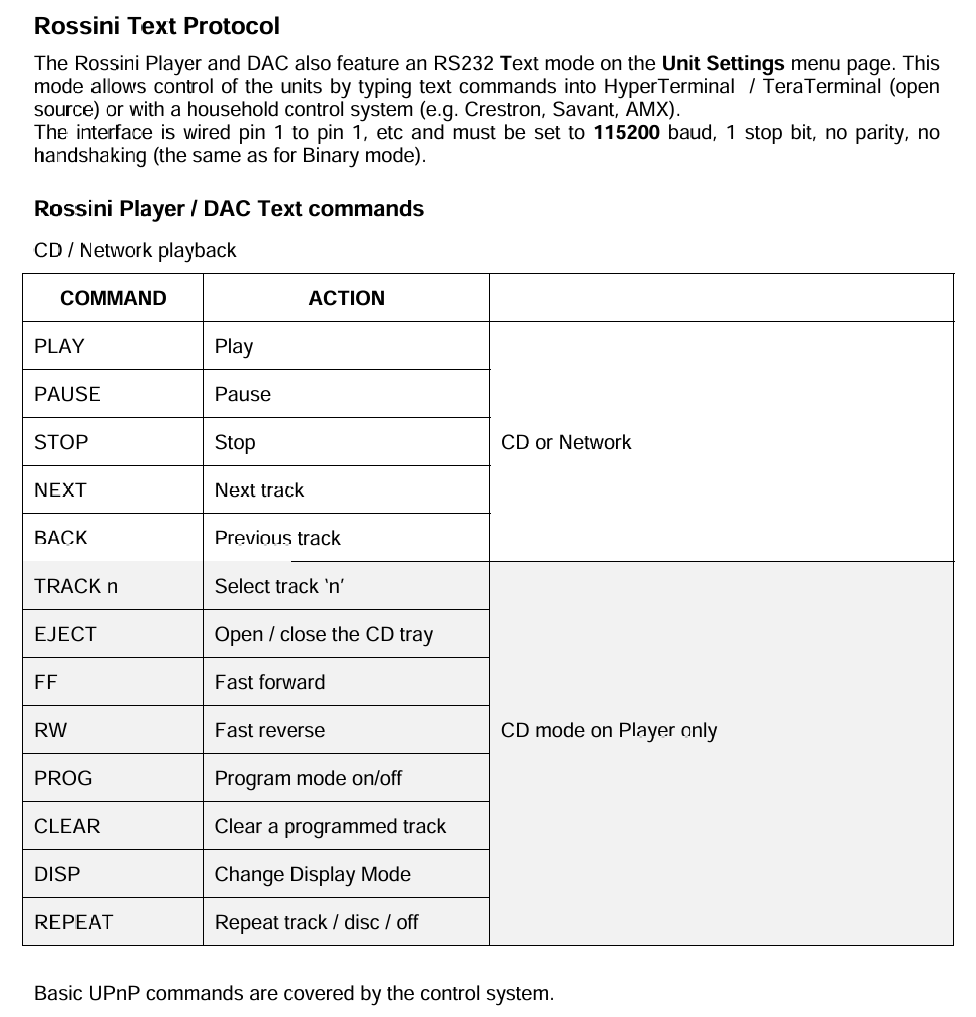
  1. Does the Rossini’s RS232 Text-mode command set include input selection? The manual mentions Text mode for third-party control systems and a HELP command, but I haven’t found the actual command list documented anywhere. Is there a published command reference?

  2. Is there any supported way to send an input-select command over the network (the channel Mosaic uses), or is that protocol strictly internal?

I have a vague memory of a thread here concluding this isn’t possible, but I couldn’t find it — if that’s the settled answer, a pointer to it would save everyone time. And if it’s simply not supported on any channel, consider this a feature request: an option for the DAC to return to the previously selected input when a network stream ends would solve this with no third-party anything.

Thanks.
For remote control via RS232, use the remote codes for the Rossini DAC.

Page 10:

https://dcsaudio.zendesk.com/hc/en-gb/article_attachments/4404384740242

AFAIK no dCS DAC offers automatic sensing of inputs carrying dataand then switching to it from another input.There is only manual selection via front panel/Mosaic/IR remote.

If so then the DAC cannot automatically recognise data,from Roon on Network input and switch to it . I suspect that you are mistaking the fact that Rossini DAC remembers the last input selected when turned back on.

The switching codes are for a third party IR transmitter and even if they would work via a software script ( no evidence of that), before any switch could occur you would need to enable Rossini to automatically sense between connections currently carrying data and those that exist but are currently “dumb”.

Does this sound correct?

No INPUT SELECT though.

Thanks both — but Ermos, I think the document you linked answers my question in the affirmative. The Rossini Text Protocol section (p.28 of that same PDF) includes an input-select command: INPUT = n, with values covering AES1/2, SPDIF1/2, Toslink, Network, USB1 and CD — plus INPUT INC and a VERBOSE mode that reports state changes. The table you screenshotted may be the Rossini Clock section, which naturally has no input selection.

PAR — on the auto-switch: my Rossini does switch itself to the Network input whenever Roon/Mosaic starts a stream to it; that’s long-standing observed behavior on my unit, not a power-on memory effect. I agree there’s no signal-sensing on the physical inputs — that’s exactly why the return trip is manual today. But no sensing is needed for what I described: Roon’s API reports zone playback events, so a small client would simply send INPUT = 3 (SPDIF1) over RS232 Text mode when I start playback on my other zone. The intent signal comes from Roon, not from the DAC sensing anything.

Remaining question for dCS staff: can you confirm current Rossini APEX firmware still supports the RS232 Text command set as documented in the Feb 2016 Remote Control Codes manual — specifically INPUT = n? If so, this looks fully solvable with a documented, supported interface.

Harry, I can confirm with the RS232 (Text mode), issuing the following text string will switch the Rossini to it’s SPDIF-1 input;

INPUT = 3

You can also achieve the same via a REST call into the Rossini over the network, the following thread explains how;

Follow-up for anyone who finds this thread later: the problem is solved and running in my system tonight. Full write-up below.

The problem, recap: Roon streams to the Rossini’s network zone cause it to grab the Network input automatically (as designed). But my other source — a Smyth Realiser A16 on S/PDIF 1, fed by a separate Roon endpoint over HDMI — has no way to announce itself, so every return trip meant opening Mosaic and manually selecting S/PDIF 1.

What made it solvable: two confirmations in this thread and one older one. Anupc confirmed the RS232 Text-mode command INPUT = 3 switches to S/PDIF 1 (it’s in the Rossini Text Protocol section of the Remote Control Codes manual, p.28 — note an earlier reply said input select wasn’t there; it is, in the DAC section). And dogmean’s “Custom web remote interface for Vivaldi” thread from Dec 2023 documents the REST interface Mosaic itself uses: plain HTTP GETs to the DAC’s IP. I tested both directions from a browser on my Rossini APEX (current firmware) and they work:

Switch to S/PDIF 1:
http:///api/setData?path=dcsUiMenu%3A%2Fui%2Fdigital%2Fspdif1&role=activate&value=true

Switch to Network:
same URL with “network” in place of “spdif1”

The automation: a Raspberry Pi 4 (~$100 kit) on my network runs a ~100-line Node script built on Roon’s official extension libraries (roonlabs/node-roon-api). It registers as a Roon extension (approved once in Settings → Extensions), subscribes to zone events, and when my A16-path zone starts playing, fires the S/PDIF 1 GET at the Rossini. The reverse direction needs nothing — the Rossini still grabs Network by itself when a stream starts. Result: press play in either Roon zone and the Rossini is always on the right input. Switch latency is a second or two. It runs as a systemd service and needs no attention.

Caveats, honestly stated: the REST interface is unofficial and undocumented — dCS could change it in any firmware update (though Mosaic depends on it, which is decent protection, and it has worked from dogmean’s 2023 thread through current APEX firmware). Keep it LAN-only. The RS232 Text-mode route is the officially documented alternative if you prefer a sanctioned interface and don’t mind a serial cable.

Also worth knowing if your second source has its own volume calibration (mine does — the A16 holds my HPEQ reference): once switching is automatic, keep the Rossini as the only volume you touch day-to-day, and the same REST interface can restore a fixed reference level on each switch if you want that automated too.

Thanks to Ermos, PAR, Anupc here, and dogmean’s earlier thread — the pieces were all in the community; they just needed assembling. Happy to share the script if anyone wants it.

Follow-up to the working auto-switch solution above — one more command would complete it.
Since the bridge now switches the Rossini between Network and S/PDIF 1 automatically, the logical next step is to have it set HEADPHONE CROSSFEED per input at the same time: Expanse 2 on the Network path, Off on S/PDIF 1 (that input carries a Smyth Realiser A16, which does its own binaural processing — Expanse layered on top would be double-processing).
Mosaic controls crossfeed on the Rossini (v2.1+), so the command must exist on the same REST interface documented in dogmean’s “Custom web remote interface for Vivaldi” thread. But his published subset covers power and input select only — and since the Vivaldi platform doesn’t have Expanse, the crossfeed command wouldn’t have appeared in his capture at all.
So the ask: has anyone with a Rossini, Bartók, or Lina already captured the setData call Mosaic sends when changing crossfeed? My guess is it’s a settings-type path with a typed value (like the powerSleep example: dcsworker:/dcs/unitSettings/… with a JSON-encoded value) rather than a dcsUiMenu activate, since it’s a four-state setting rather than a button — but I’d rather have a captured command than a guess.
If nobody has it, I’ll run Wireshark against Mosaic myself and post the result here so the thread stays a complete reference. Same caveats as before apply: unofficial interface, LAN-only, could change with firmware.