Hi - I’m currently running the most recent 2.01 control board version on a Bartok, network board version 1.4.4. I’m using the most recent update of Spotify.
In the past, I’ve been able to play Spotify directly from my phone to the Bartok. But now, my Spotify can’t “see” the Bartok at all. When I go to the Spotify site, the only dCS device that comes up is the Rossini. Is the Bartok just not supported by Spotify anymore?
IIRC the Bartók has supported Spotify Connect ever since it was released. In the most recent network firmware release, 529, we added support for Spotify Lossless. As an aside, the network firmware and therefore protocol support are identical for Vivaldi, Rossini and Bartók as they all use the same network boards. I can confirm it is working fine, I am using it with my Bartók right now.
Assuming nothing has changed in your network since it last worked and given that you can see your Rossini (which tends to rule out a problem at the client end), it sounds like the network board in your Bartók might somehow have lost the plot a little bit. If a restart of the Bartók doesn’t solve it the next thing you could try is resetting the network board via the Bartók’s web interface.
I power cycled the Bartok, which didn’t work [e.g., on the Spotify app on my phone while playing a track I don’t see the Bartok device at all as a output option, where I used to; I can see other compatible devices in the same room]. I then used the web interface to reset the streaming interface to factory settings, power cycled again, and it still didn’t work. I’m using the latest version of Spotify premium and have logged out / logged back in. The Bartok is working perfectly when using Roon / Qobuz. I’ve also tried from the Spotify app on my computer on the same network, and that also doesn’t see the Bartok.
I’m sorry that I was a bit unclear in my first message - I don’t have a Rossini, only a Bartok - I should have said that on the searchable Spotify web interface listing compatible devices, only the dCS Rossini is listed under dCS. But from your description, that should be a non-issue.
First thing to check is that your phone and the Bartók are on the same subnet. Can you check the IP address of your phone and the IP address of your Bartók (Mosaic or front panel). They should have the same 3rd number, i.e. if the IP address is WWW.XXX.YYY.ZZZ the YYY should be the same on both. Please could you check and confirm.
Maybe we’re getting somewhere now. The IP of my iphone is 10.0.087 and the IP address of the Bartok on Mosaic is 192.168.1.245. They are both on the same wifi network, however.
If the IP addresses that you quote are correct they cannot be. The phone number quoted doesn’t even have a correct structure. I have no idea what this is.though.
I suggest that you open settings on your phone then select wi-fi, You may then see a list of all of the networks it can pick up. Most will not relate to you ( they will be other networks in the locality). Look for the name of your network ( probably the first in the listt). You may have named it or it will be identified by the type of router that you use.,. Select this and it will request the router’s password.
Once the phone and Brtok are on the same network the Spotify app should then identify Bartok as a choice of speaker.
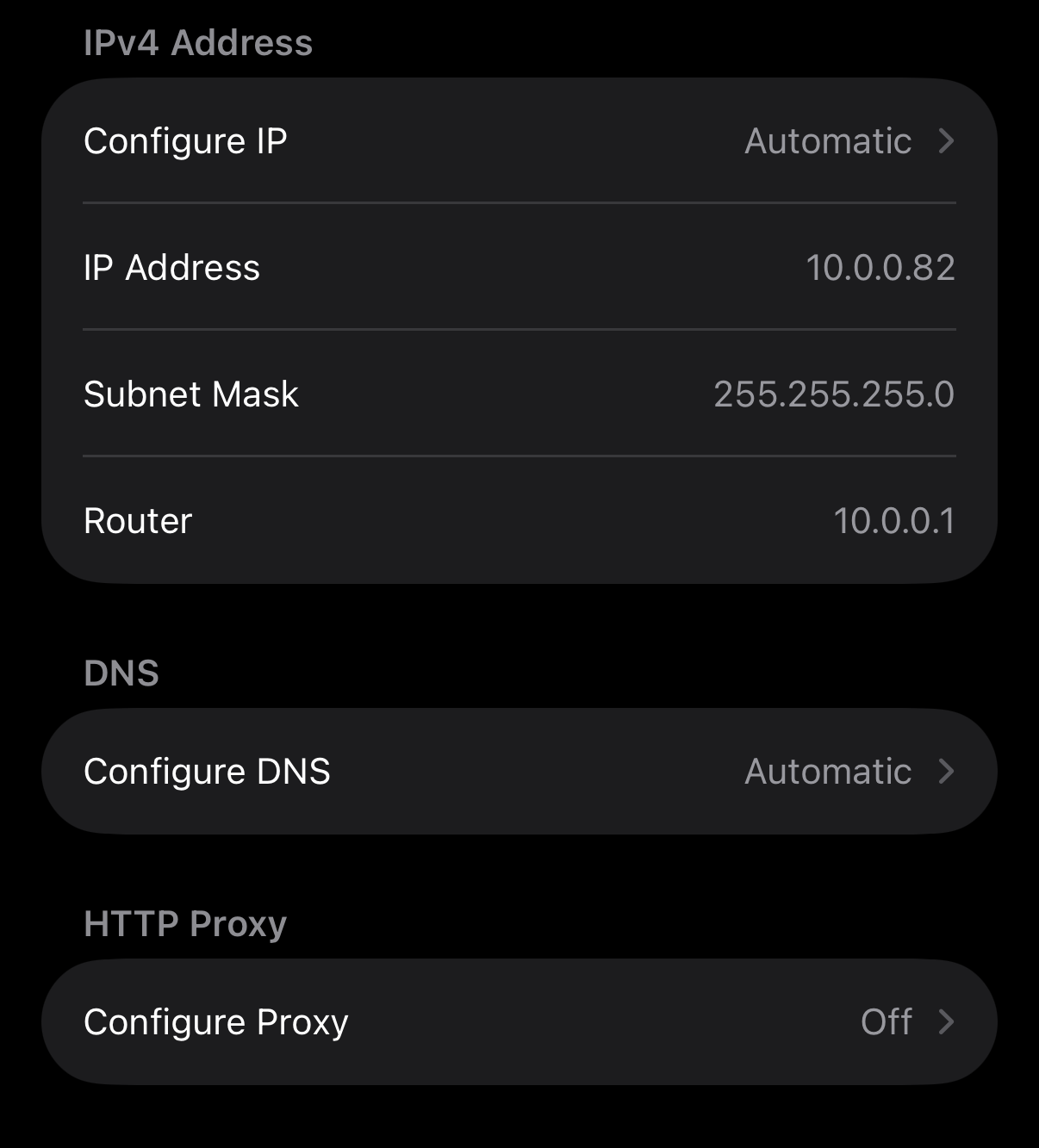
Thanks Pete. I’m no expert, but this is what I see under my iPhone settings as listed as the IP address for my phone (below). I’m pretty sure the IP address of the Bartok is correct cause I’ve used the web interface via that IP address to reset the network settings of the Bartok. Should I be manually selecting the IP address of the Bartok on my phone?
Both my phone and Bartok are on the same WiFi, as they have always been. Thanks Dave
Either you have you have set a static IP address on your Bartók or (more likely) you have two DHCP servers on your network (two routers allocating local IP addresses in two completely different address ranges).
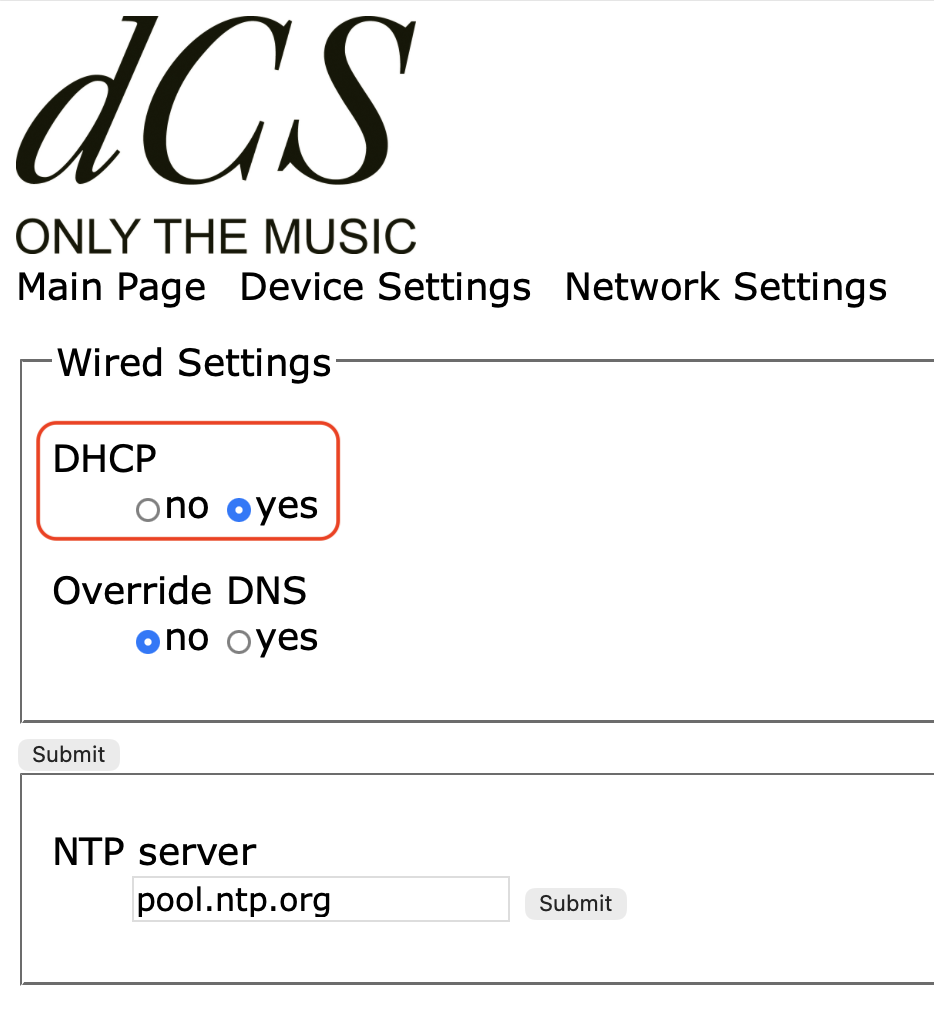
The former is easy to check, just open the web interface on your Bartók and check that DHCP is set to yes in the Network Settings tab:
If it is already set to yes then you have to figure out which two units in your network think they are in charge of address allocation and turn one of them off.
Thanks Andrew. I confirmed that DHCP was set to “on” on the Bartok. I decided to take them both off the mesh WiFi location and instead point them both directly to the router, and now it’s working! Thanks for your help. Dave
I think I know what is going on here, let’s see if I’m right:
You have a router from your service provider, this offers both wired Ethernet and wireless
You have a mesh network that is connected to the wired Ethernet, and provides a separate wireless network, with a different SSID than the aforementioned one
I suspect the mesh router is set up as indeed a router, in that it creates a different IP segment to the one the service provider router presents. In a home environment, this is generally a very bad idea and creates all manner of discovery problems with your various devices.
You should set your mesh router to be rather a bridge, or access point. This unifies all segments in your home, and lets the service provider router be the boss of it all and be the sole DHCP server. This will likely resolve all your visibility issues.
You may even set the SSID of the mesh wireless segment to be identical to the one provided by the service provider router and let the wireless clients decide for themselves which access to use.
Thanks Paul - yes, I think that is exactly right. I’m gonna look into how I can change my setup in the way you describe, because I have had a lot of trouble with my devices getting lost in the cloud, as it were. Thanks Dave
 .
.