That sounds like what I frequently run into as well. I can see the input board go dead (no network connection on the display) and then click and reset itself. My iPhone displays a cannot connect message in Mosaic. It takes 10-15 seconds for the board to click and reconnect. Often I will quit/restart Mosaic to jumpstart the recovery process
Hi Gregg,
This is actually a brilliant comment that you’ve made and I’m really glad that you did - please don’t think that in my using it as an example that I’m taking any kind of dig at you though because I’m not…
Early on in my “previous life” I originally looked after a multiroom streaming system that was based on something called StreamNet that was a streaming audio protocol developed by NetStreams that very heavily used IGMP routing and so it relied upon managed switches to function … some of the switches that we used, when reset to factory defaults, actually blocked / disabled UDP and network broadcast functionality until they were specifically ENABLED in their management
1 Like
Absolutely but can I also ask one thing here …
Do you have a different switch (a normal one) that you can substitute in instead?
If you CAN reproduce the issue then can you do the same WITHOUT the S100 switch in place and confirm that the reproduction steps still work?
Cheers
Phil
2 Likes
Hi Phil. Is this a mix up? it is me with the S100 ,not Anup. I have already commented earlier anticipating such a request that swapping out the S100 is not easy for me. No alternative switch I am afraid. However as the screen blurring only occurs with Android and not iOS this would suggest that it is not a problem caused by the network which is, of course, used by both formats.
Hi @PAR,
No - Anup was replying to @imprezap2 (who said he has an S100) about his unit effectively disconnecting from the network and then reconnecting again so I was just adding to his reply.
Cheers Pete
P
1 Like
Spot on Phil.
Sorry for the late reply, have been ill the last couple of days and didn’t touch my tablet at all.
Not sure if I can replicate it at will, as I said the system worked great with the S100 in place for a long time. But will try when I feel a bit better again.
Just as extra info, my TV is also connected to the same S100, and I never have any dropouts watching Netflix.
Ive been having the same problem for the past 3 months. i try to stop playback using mosaic on my Iphone 10 when i push the stop button the screen swithes to the album cover with no other buttons to push tap on the album cover and go back tothe play screen with the music still playing try to press the stop and swith back to the album comver again this can last up to 10 minutes before i can shut of my music on my DCS Bartok. i am upgrading to Apex next month and was hoping that would help with the issue+
Hi John, nice to see you back.
If you scroll up this thread you will find a post from me with a screenshot. I think that this may be what you are experiencing. It would be great if you are able to post one of your issue which will help confirm if it is the same thing. If so then dCS are aware of it but further examples may help.
If you read on in the thread the thought was that this might involve installations where network switches are cascaded. Perhaps you could comment on your network arrangements too.
Apex has nothing to do with Mosaic or this problem. I can assure you, however, that you are going to love it. It isn’t a superficial upgrade but ensure it is given time before you judge. It’ll sound good “out of the box” but I use a rule of thumb of 200hrs + usage to show what it can really do.
1 Like
Hi Pete, thanks for the reply
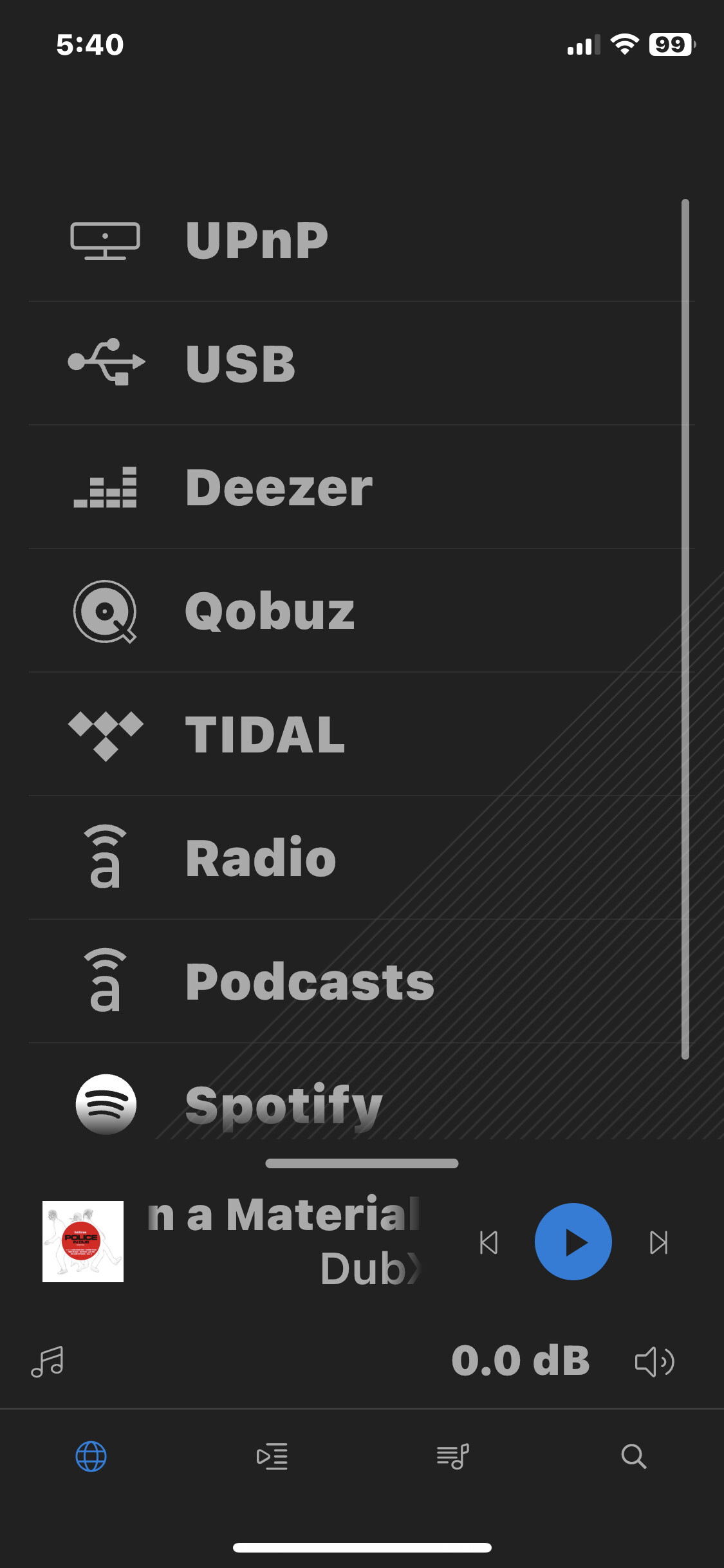
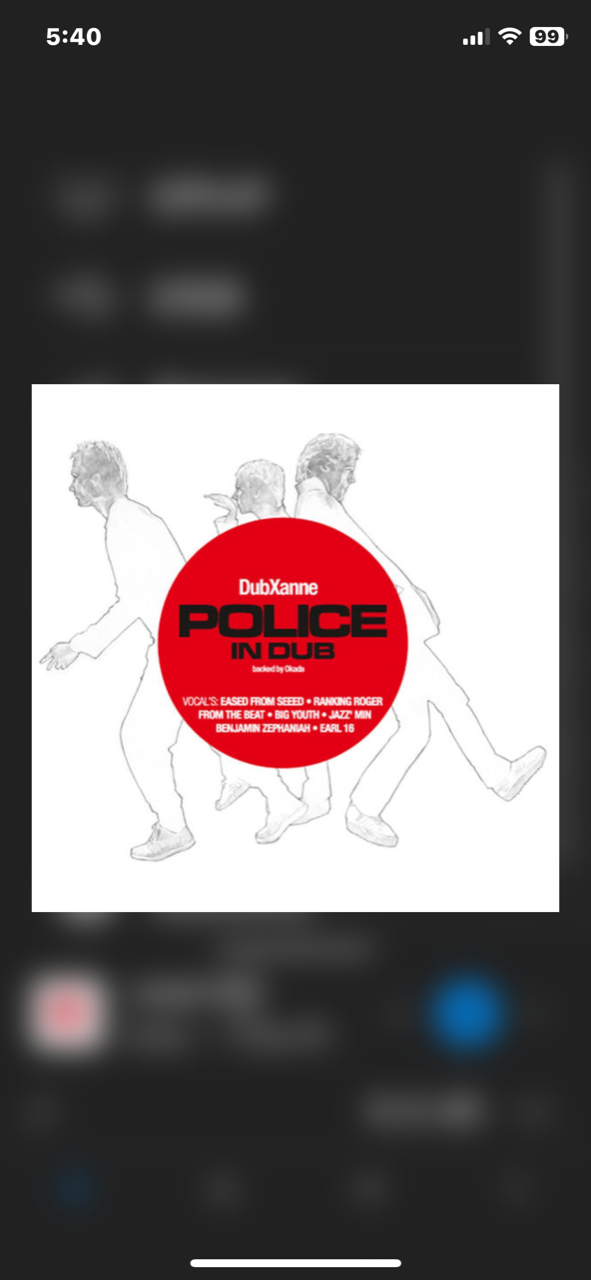
here is a picture of the screen i start with and then the screen i go to when i tap on stop
Hope this helps.
Looking forward to the Apex upgrade also a speaker upgrade at the same time Whooppee
1 Like
Thanks John. Your screenshot appears to show the same issue I reported. I am tagging @Phil so he is aware though I trust that he will not see this until returning from the Christmas break.
In the meantime you may recall that I mentioned this:
Do you have more than a single network switch? For example my router is then connected to a Melco S100 switch.
Good luck with your double upgrade though changing more than one thing at a time can be confusing.
1 Like
Hi Pete,
(un)fortunately not … 
OK so the reality is that there is very little that we can do about issues with Mosaic reconnecting to one of our players. Neither the App nor the player have any visibility of what is going on on the network beyond what they can see happening on the bit of wire (or WiFi) that they are connected to.
The app will try to reconnect to the player at the same IP address that it was connected to previously, if there is nothing at that IP address (or there is something else other than the player) then it will start to search for the player but all of these require that the underlying network is working correctly.
It is sometimes raised that after a firmware update “network discovery is broken” and that we need to “fix it” but we don’t write the network discovery code - those are libraries maintained by Apple (iOS) or Google (Android) and they are used by thousands of other apps and developers, we don’t recreate the wheel by writing our own network code and even if we wanted to we wouldn’t be allowed to because before an app is allowed to go live on either the Apple Appstore or the Google Playstore both Apple and Google do an automated test run on your app to make sure that it uses all the prescribed libraries (and in the documented ways) and that you are not doing anything naughty by doing things like hitting hardware directly.
So, if you are having discovery issues or reconnection delays (and your player is showing that it is connected to your network and has a valid IP address if you look at the front panel Menu → Information → Status menu) then the first place to start is to minimise the path between your player and your router - we provide an Ethernet lead that works correctly so can that be used to temporarily connect your player to your router just to confirm whether the discovery / reconnection issue still exists?
BR
Phil
2 Likes
this for all the responces
my Mosiac issue may be my Iphone X i notice it looses connection with the wifi quite often espicially when i am at work, usually have to restart Wifi on iphone hadnt tried that at home.
as far as my home network i only have fiber coming into my house then a 50 ft cable to my TPlink router that is on my equipment rack about 5 feet from the Batok, no switches
cheers
1 Like
Hi John,
In that case I think the first thing to do is to - when your phone isn’t able to connect to the streamer - pull up the streamers front panel Menu → Information → Status menu and take photos of the pages of information that are shown there and get them to me/us at [email protected] so we can start to try to identify what might be happening.
BR
Phil
2 Likes
So, for the first time in the entire time I’ve owned my Bartok( and I have a Bartok Apex as well as the original) I’m having problems with Mosaic.
It is nonresponsive to commands, and I have long, intermittent dropouts when playing through it . I have no trouble connecting via airplay or Tidal connect, I have rebooted the router reinstalled the app and done everything someone could technically do to troubleshoot this. Nothing has changed in my network configuration and I’ve never had a problem prior to tonight. This is absolutely A problem that is limited to mosaic, and no other app or application for the DAC. Really hope someone can provide an update, because this makes it impossible to use the superior sound quality of mosaic, which I’ve grown to depend on.
1 Like
The answer to your problem is in this thread and is dealt with frequently in this forum. Please read the posting from @Phil above this one where he gives you the contact address of dCS support. Try contacting them.
What you have done so far will have had no effect on the nature of this issue, as you have found. You may think we are referring the physical configuration of your network i.e. components or wiring. We are talking about the software configuration of your router or other switch. If this has been OK until recently and suddenly that may imply that the software has been updated without your being aware of it.
You need to open your router/switch configuration software ( reminder; you will need your password). You can check the system version number to see if it has altered. However this stage is not important for the actual solution. Either way you will need to look through the menus you will now see and check that e.g. IGMP snooping is unselected.
Just to add to Pete’s response. If you weren’t aware, Mosaic is not in the path of audio streams, it is just a control point to tell the dCS DAC what to do.
If you’re having audio drop-outs from your Bartok, that suggests you’re having networking issues from the Bartok to the Internet, it’s not Mosaic issue.
1 Like