Hi all. I sold my vivaldi Upsampler with net board installed. Vivaldi dac and clock remain. For many years I used Mosaic app to link to my Qnap Nas via wifi. Now I need to connect Mosaic to the Nas via USB. How to proceed? A little help from my friends?
Hi Piero,
Sorry to be the bearer of bad tidings but I don’t think this is going to work out the way you maybe thought.
USB is an incredibly versatile protocol, like ethernet. It can do any of 100 different things, including transfer files and transfer audio. If your NAS has a USB port, that will be for transferring files, the USB port on your DAC is for transferring audio. Even if they use the same underlying cable they can’t talk to each other. You need something in between that can open up the files and extract the audio samples. That is what the streaming card in your Upsampler did.
Now you need that, or something else that can do the same job. You could use a general purpose PC like a laptop to do it but it requires some computer skills and probably won’t sound as good as your Upsampler.
Thks Andrews. So you mean that if I buy an external streamer like Aurender or others I will solve my problem?
Yes, there are definitely products out there from Aurender and others that would do what you need.
Just to be precise your query was connecting Mosaic to NAS. As you have sold the Vivaldi Upsampler you now cannot do this as Mosaic was in the Upsampler. What you have on your phone or other device is Mosaic app which is only the controller of Mosaic.
So if you buy a streamer you will need to install a fresh app on your device that relates to the new streamer. For example, if you buy Aurender then the control app is called Conductor.
So as well as information on the streamer itself ensure that the matching controller app provides the services that you want.
Thanks Pete for clarification. I will buy an Aurender which will replace the upsampler in all features included the Conductor app installed on my Ipad.
Well, not all features. No Aurender will let you to change settings and perform firmware updates on your Vivaldi DAC for instance, and only a couple of models have wordclock inputs. But they will certainly let you play music from your NAS via your Vivaldi.
Curious, why’d you sell off your Vivaldi Upsampler? 
Because I think, as streamer, there is something better. am I wrong?
Yes. IMHO, you’re wrong unfortunately.
I agree with @Anupc . I doubt if other streamers will offer better audio performance than Vivaldi.
An alternative streamer to Vivaldi which offers compatible features ( as far as possible, you will lose some that are unique to the Vivaldi system) may also turn out to be costly. For example the best Aurender N30SA exceeds the price of Vivaldi Upsampler but I doubt if it will sound better. Maybe a bit different at best. I am not sure if the brand still offers dual AES analogue output which is,other then network, the best interface with Vivaldi DAC IMO. Nevertheless, Aurender make a good product and you may even prefer the control app.
For the future I would advise that it is best not to sell any existing unit before you establish whether or not any imagined benefit from an alternative is actual.
In addition to Pete’s points, not only is the Vivaldi Upsampler totally transparent sonically, it’s probably the most versatile Digital-to-Digital platform in the market, even today after well over a decade since launch. DXD, DSD, DSD2, SDIF-2, AES, SPDIF, TOSLINK, Rate conversion, Interface conversion, Transcoding, Upsampling, Ethernet, USB, External Clocking, Roon, Spotify/Tidal/Qobuz-Connect, etc. etc.
Not sure what your thought process was, but I definitely recommend not believe some hype you might read about other external Streamers. IMHO, you will struggle to find anything else in the market that’s close to what the Vivaldi Upsampler is capable of, not to mention it works seamlessly with the rest of the Vivaldi platforms.
Thank You all. Now the system is Dac Vivaldi Apex ( before I had Vivald Dac “simple”), Vivaldi clock and Aurender N30SA. UpsampIer Vivaldi has gone.. did not follow your suggestions,sorry..If you were me what kind of connections should I use beetween Aurender and Dac Apex? How to configurate the Apex? I listen liquid music stored into the Aurender… Thks
We recommend USB. See the setup guide here: https://dcsaudio.zendesk.com/hc/en-gb/articles/22346043080988-Aurender-N30SA-Setup
Thks Andrews for suggestion. I will try with a good USB cable instead of a good AES/ EBU XLR I am using now ( Stealth Optima T ). Done this, ha a sense to add a DCS Upsampler pLUS ( or an old Upsampler upgraded to the streamer mother board , keeping my Aurender N30SA?
Sorry Piero, not sure if I understand your question.
The functional capabilities of the two products overlap, but both also do things the other can’t do. For instance the Aurender has local storage but the Vivaldi Upsampler can manage settings and firmware upgrades for the Vivaldi DAC. Only you can judge how important those things are to you.
For the things they both do I have no idea which is better. It all comes down to the choices of inputs and outputs and the quality of the Aurender upsampling and filtering algorithms, with which I have no experience.
One thing I find interesting is that the Aurender, according to its spec sheet, uses OCXOs. These operate at a fixed frequency that can’t be ”tuned” (unlike VCXOs). But it also has a master clock input. How does this improve the accuracy of the OCXOs when these are fixed? Very curious..
Yes Andrews . I understand. I connected the Vivaldi clock to the Aurender and it works well.
But my question is how to connect in the best way the Aurender N30SA to the Vivaldi Apex. You say it is better via USB. You suggest me to read https://dcsaudio.zendesk.com/hc/en-gb/articles/22346043080988-Aurender-N30SA-Setup but it seems Aurender, after disconnecting the the option of DSD native, does not allow the audio signal to be transmitted to the DAC. In fact, the DAC’s display shows always AES1 and not USB class 2.
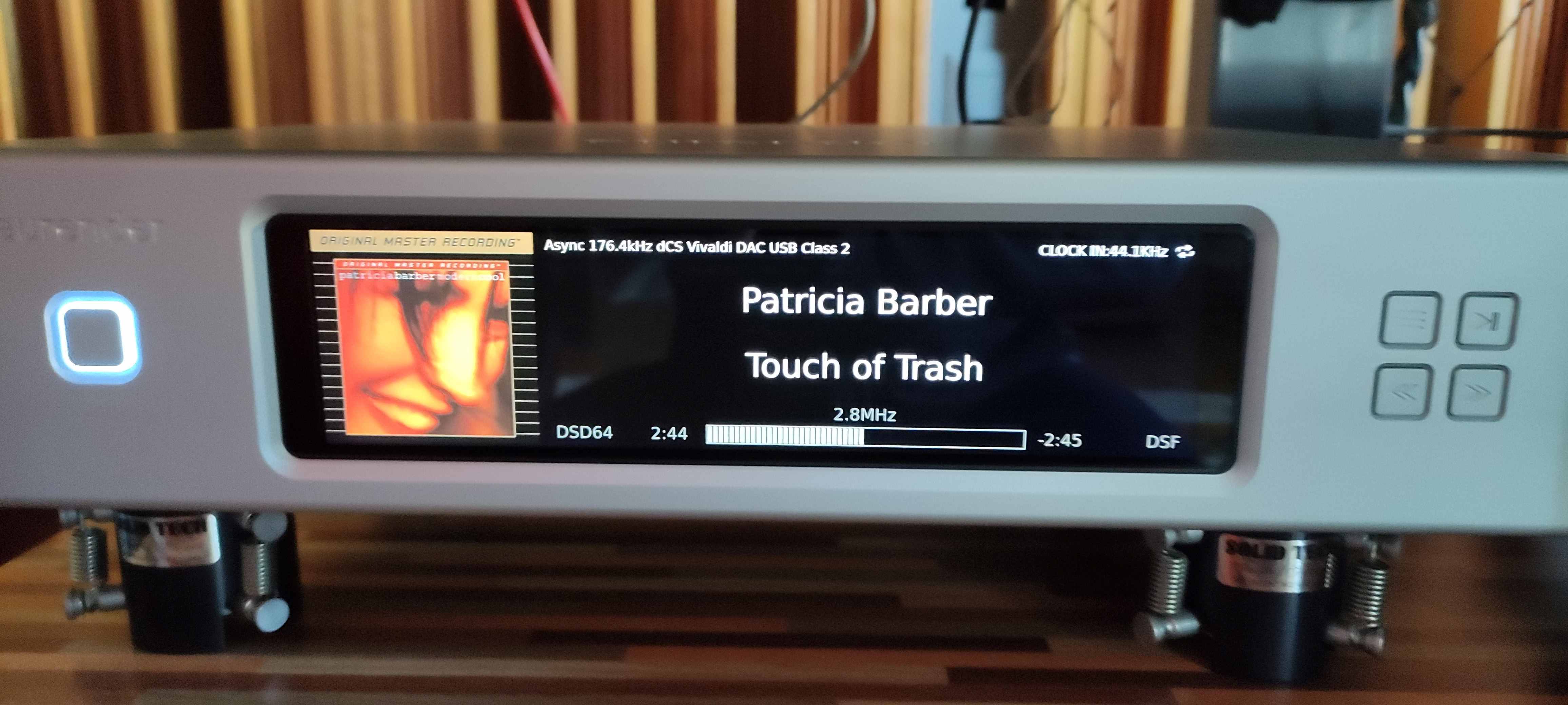
Sorry Piero, I’m afraid I don’t have access to an N30SA so I’m not really able to help you troubleshoot this any further. When the DAC senses a signal on the USB input it is added to the list of “active” inputs that are cycled through when pressing the ‘Input’ button on the front panel or the remote. I presume you have pressed the ‘Input’ button to swap to the USB input? The ‘Native DSD’ setting must be disabled as the USB connection doesn’t support native DSD, only DoP. We have tested this at the factory and know that it works with all our USB DACs.
I think it worth adding that DoP is DSD. It is just a way of transmitting DSD data but in a PCM “wrapper” . I am writing as I have read (elsewhere) from people who incorrectly think that it is a conversion to PCM.
DoP = DSD Over PCM