I have audio files on my M1 MacBook Pro that I’d like to hear through my dCS Vivaldi One (with APEX update). I tried a USB thumb drive (failed - One didn’t see drive) and directly from MacBook (failed - played through One but incorrectly, intermittent chunks of audio “off and on”). I’m sure I’m doing something wrong, and I just need to learn the right way to do it. Can anyone point me to the procedure? Thanks in advance!
@AndrewS would know such things I believe.
I am sure you are connecting the laptop to the USB1 input and if so, please refer the manual carefully, you may have to change the USB class when using a Mac.
As @hifimckinney suggests; read the user manual.
Using a thumb drive directly into the USB port is not a great user experience and is really there for limited use such as a friend bringing round a few tracks.Note the format requirement.
A better way of doing things from a mac or pc is to use the Vivaldi only as a USB DAC with your tracks being played and navigated via a media player installed on your computer such as Audirvana.
Another way ,that allows use of dCS Mosaic, is to treat the mac as NAS with network connection. For this server software will need to be installed on mac. Recommended and supported by dCS is MinimServer2. Free version to try but if you like it there is a small annual licence fee and this provides further features.
However if you are new to any of this there is a bit of a learning curve.
According to the manual:
Connect your flash drive to USB 2 (A-type). Flash drive formats should be either FAT16, FAT32, or non-encrypted NTFS (see page 32).
Connect your PC or MAC to USB 1 (B-type). Select desired USB class (see page 18).
Thank you! It turns out, I connected to USB2. Haven’t tried USB1 yet for the laptop, but good to know there’s guidance in the manual.
Thank you! I will look into and learn about Audirvana and MinimServer2.
Thank you, this will help me learn what is in the manual. Most appreciated!
I’m using a Sandisk 2TB Extreme Pro MicroSD into a Sandisk Mobile Mate reader, formatted to NTFS. Admittedly it’s far from being full, I put about 160GB of music there so far, but it’s working without issues or particular delays. Haven’t tried DSD/DXD files yet, but 192/24 FLACs play just fine.
Very helpful - thank you!
Thanks @August and apologies for being late to the puck here, hectic travel schedule.
I think @meltemi has covered it, I suspect the problem was that Steven was trying to connect his Macbook to the USB 2 (Type A) input instead of USB 1 (Type B).
As an aside I believe pretty much all devices these days are Class 2 so this setting is provided purely for historical compatibility.
1 Like
The Vivaldi One can’t read files directly from a USB drive; it needs to be used as a USB DAC. Connect your MacBook to it with a USB cable, select the Vivaldi as your output in Audio MIDI Setup, and match the sample rate to your audio files. Use a player like Roon or Audirvana for smooth playback.
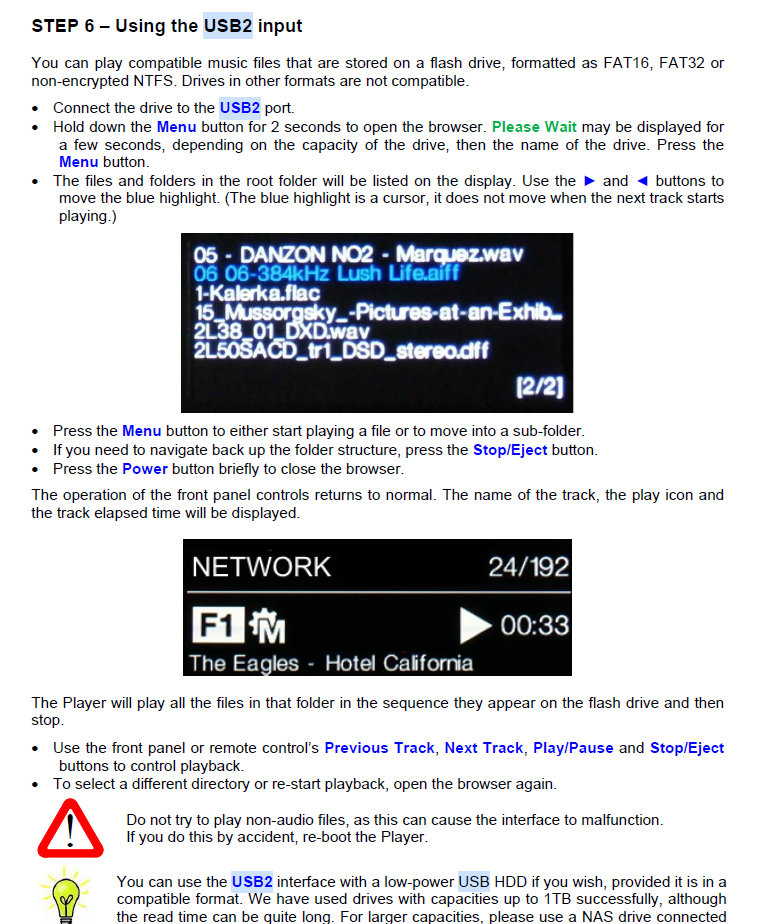
As has already been pointed out by @Fafner … the Vivaldi One CAN most definitely read files from a USB mass storage device however it isn’t a method that we would in any way recommend for a large collection of music.
Instead we would recommend using a UPnP server (we recommend and test against MinimServer) and this can be hosted on your computer, a NAS or even something like a Raspberry Pi.
Phil
Thank you everyone! This was my first post after joining the dCS Community and all of the responses were so helpful. I’m glad to be here and feel very welcome!
4 Likes