I am trying a 7 day test of Audirvana but can’t get my Varese to appear as an audio source over the network. Is the only way to get it to work is with a local Mac and a USB cable? If so that’s a deal breaker.
Thanks
I am trying a 7 day test of Audirvana but can’t get my Varese to appear as an audio source over the network. Is the only way to get it to work is with a local Mac and a USB cable? If so that’s a deal breaker.
Thanks
Why you want use Audirvana?
Nick
Basically that is correct. Audirvana is a media player application that needs to be installed on a computer and, like other apps, will not have an IP address other than the computer so will not appear as an object on the network.
If the computer’s output is USB ( probably is) then a USB/coax converter could be used if you wished but I don’t think that may be what you are seeking.
Audirvana does not need to be controlled from the computer where it resides though. Audirvana makes a remote to install on your phone/tablet device. See App Store.
I assume that you have an I/O module with your Varese, however I do not know if this provides compatibility with USB or coax though I believe I have seen a USB B port.
When I tried it with my Vivaldi Audirvana found it on the network. So wireless from laptop to wired network.
Just looking for an alternative to Roon. I don’t need another device in the chain so I guess Audivrana isn’t for me. I don’t have the I/O board in my Varese so this is probably all moot anyway. Uninstalling!
That is new on me. What is Vivaldi Audirvana? I am not sure how effective music via wifi is as @Anupc has remarked in the past about packet queuing etc, that may result in a loss of quality but beyond this I do not have further information.
Sorry John, Audirvāna isn’t certified with Varèse yet. There was a statement on the Audirvāna website which predated the release of Varèse and said that ”all” dCS network players were certified. We’ve asked them to update that.
Certification is work-in-progress.
Hmmm… Audirvana (at least the Classic version) used to be fully UPnP spec compliant. Meaning, sitting on the network, as a UPnP Control-Point, it should at least see the Varèse, no?
I would have thought the “certified” part is just the auto configuration recognition aspect, which the UPnP specification doesn’t include. 
Well, it turns out that after an “upgrade” to my wifi mesh routers (from an Orbi RBR 850 mesh system to an Orbi 970 mesh system) UPnP isn’t working anywhere. So I have further troubleshooting to do.
John, UPnP uses SSDP (multicast) extensively for device discovery between Server, Renderer, and Control-Point. Audirvana is both a UPnP Server and Control-Point rolled into one, so that part is ok, but Renderer (dCS) discovery could be an issues - WiFi Mesh devices are notorious for screwing up multicast packet transmissions.
Yeah, I spent the afternoon yesterday on ChatGPT walking through various troubleshooting procedures and “we” couldn’t get it to work. It seems to think it has to do with IGMP Snooping whatever that is. Right now it is just an experiment but it should work. On my old router (same topology throughout except for the routers) I would start the server and it would appear immediately on the renderers to browse and play (Mosaic mainly.) Now nothing. Gotta love that technology!
IGMP Snooping is where the network device (Router, Switch, or WiFi AP) tries to be smart about managing multicast traffic traversing through it. If it doesn’t see a multicast group Join request, or the join request has expired, it will stop forwarding multicast packets.
So, devices have to periodically keep sending multicast group join request across the network, which doesn’t always happen.
Best to turn OFF IGMP snooping where possible.
That’s what ChatGPT suggested also but I don’t think that the Orbi 970 allows that as far as I can see in the menus.
Hello,
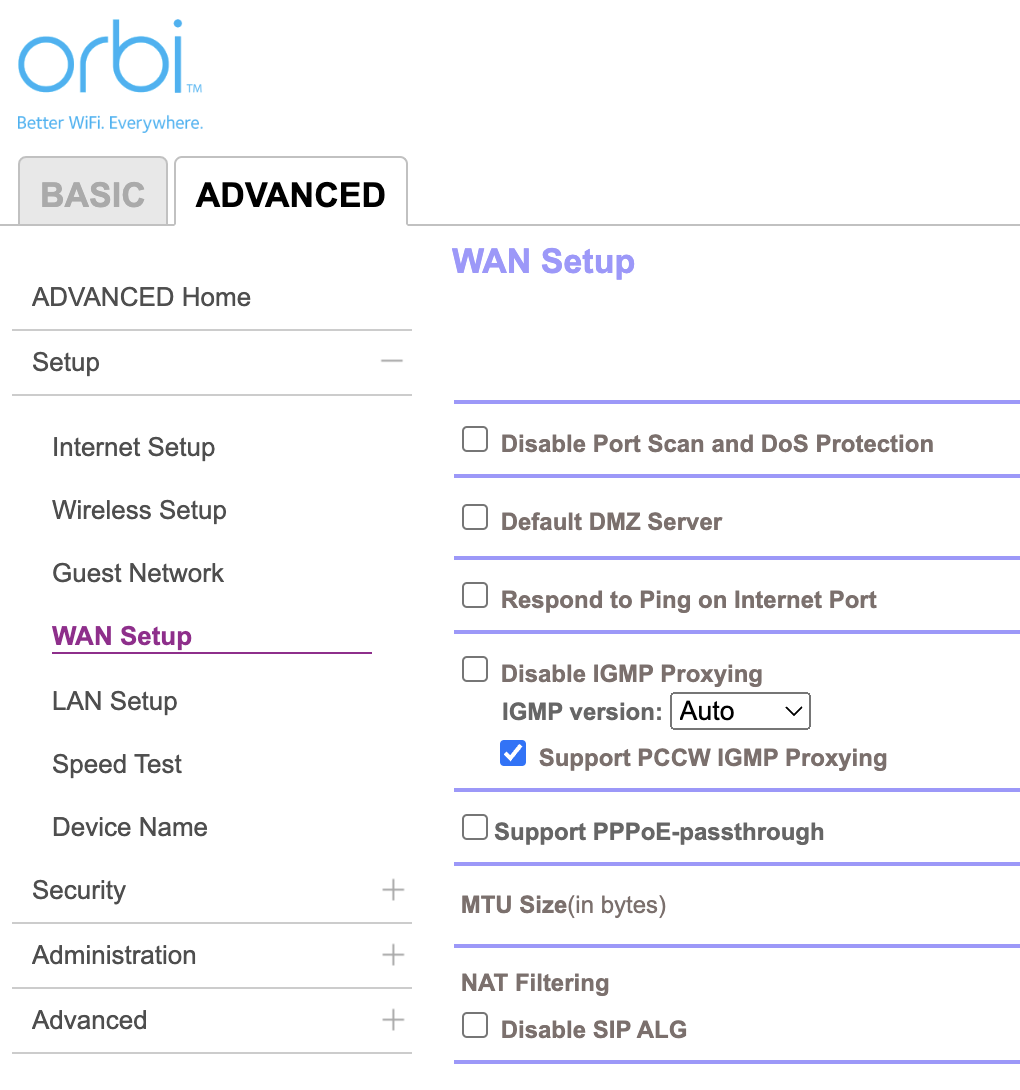
Don’t you have something similar to this under ADVANCED / Setup / WAN Setup? (Here the menu for an Orbi 850)
I don’t have a Varese nor do I use UPnP on my Vivaldi. I switched a few months ago from an older Orbi to a newer 870 network and it has been rock solid once the setup was complete. I did verify that I do have the “Disable IGMP Proxying” box checked. FWIW
Orbi don’t provide IGMP Snooping.
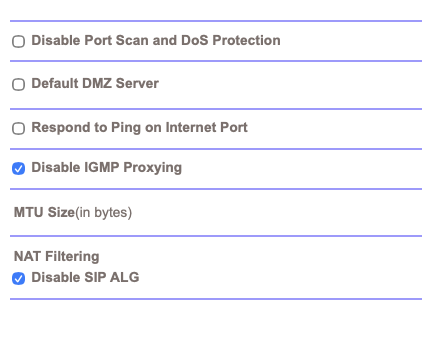
Now, I had issues with Qobuz connect and my NAS uPnP server by the past, and came to the settings as shown above.
What if you try the same?
I will try and see what happens. On my old router I didn’t have to do anything and it worked. Progress I guess!
John, IGMP Proxy is very different from IGMP Snooping. Do not disable IGMP Proxying, it aides in ensuring multicast signalling traffic is forwarded across the Orbi (albeit, it looks like that setting only applies to the main Orbi Router’s “Internet” port and not the Satellites).
I’m assuming your dCS is hardwired to the main Orbi Router, and your Audirvana machine (Macbook?) connects to an Orbi Satellite WiFi AP, is that correct?
Other than the very rudimentary Orbi User Manual, I can’t find any documentation that suggests the Orbi Mesh doesn’t properly handle multicast traffic from the Satellites (but then, nothing suggests that it does either - and as I mentioned, WiFi Mesh devices are notoriously bad at handling multicast).
You might try hardwire connecting your Audirvana machine to the same switch ports as your Varèse and see if things work, before you try it over the Mesh network.
Yes both the Varese and my Mac are hardwired into a switch that then goes into the main router. ChatGPT had me make sure that was the case. The NAS is on one of the satellites. ChatGPT next wanted me to add a seperate dumb switch that just contains the Mac and the Varese. But I don’t have enough power outlets to do that so that’s where I stopped. I want to emphasize that everything else in the topology (wires, switches, etc.) is the same just the routers (main plus 2 satellites) changed. Same brand too (Orbi). Not sure why it won’t work now.