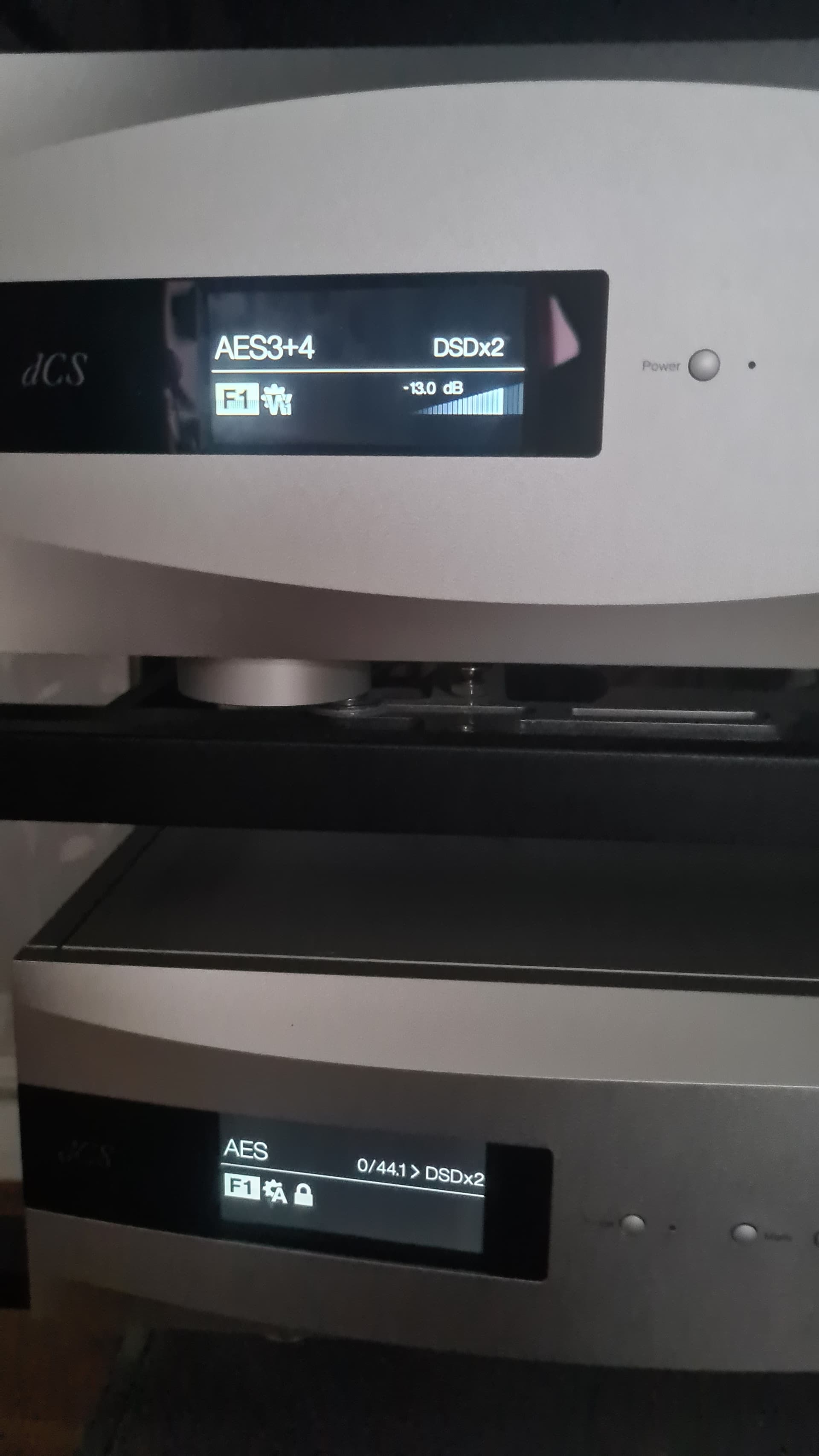
Mike you haven’t done all i suggested as.
As I suggested, the upsampler needs to be on aes.
The dac remains on aes 3 +4
Mike you haven’t done all i suggested as.
As I suggested, the upsampler needs to be on aes.
The dac remains on aes 3 +4
Hello Dunc & Pete,
AES settings as you suggested Dunc and Upsampler sampling rate set to 44.1 KHz Pete.
Transport set to 44.1Khz and 75 ohm load. Clock symbol shows on screen.
Disc spinning and counting down.
But no sound out.
From your earlier postings I understand that the SMSL transport is connected to your Vivaldi Upsampler using the latter’s AES input. I s this correct? If so, has that been selected as input using Mosaic or the front panel button or have you just stuck the connector into the upsampler port hoping that is all you need to do?
Your reference to setting the sampler sampling to 44.1 seems you are confusing sampling output with input. The output selection is for the rate that you want to upsample to. So if you set the sampling output rate to 44.1 for a CD then, as CDs are 44.1 sources, you have the same rate in and out and are not upsampling at all. This will, however, insert digital padding so that the output from a 16 bit CD emerges as 24 bit. However no additional information is created.
You select the rate that you want to upsample to using upsampler output in either Mosaic or tusing the button of the front panel. The front panel button will cycle through the options that you can select.
Assuming you have set the clock’s twin BNC outputs to Vivaldi upsampler ( group 1 and 2) and DAC wordclock group inputs to matching 1 and 2, if word is set as auto then the correct timing sample rate will be automatically selected.
The Upsampler is connected to Vivaldi DAC using dual AES. You can use AES 1+2 or 3+4. Your earlier posting says that you are using AES 1+2. Remember that these too need to be selected as the DAC’s inputs using the front panel button, Mosaic or (perhaps if you have it) the IR remote.
Well the clock on the transport is set correctly and as Pete has said is the upsampler set to Aes input?
As like I said from the start and then again, you will need to put it on Aes input and not network.
Maybe take a pick of the display on the upsampler it should have aes on it and the dac will say aes 3 + 4 as normal. You don’t need to adjust the dac at all. It’s just like using a pre amp and selecting a different input like cd or tape, or phono, etc. But you need to do this yourself it won’t do it automatically.
So basically if you can still hear music when you are streaming? All you need to do is go into mosaic app. Touch the 3 horizontal lines in the top left corner. Then touch audio, then source, then AES.
That’s it, it should then play from the AES input (cd transport in your case) then you can set the upsampler rate to what you want, from 44.1 upto DSD x2, plus filter and maps,just like you can when streaming.
Hopefully this 2ill help you master it.
Hello Dunc & Pete,
Having set the Vivaldi DAC, Upsampler, Clock and the CD transport up as advised and checked the AES, clock and power cables I have come to the conclusion that the CD transport must be faulty. The disc spins, counts down but the DAC and Upsampler screens show no data coming from the transport. Perhaps the laser is not functioning ?
My Vivaldi system makes lovely music from my Melco stored files and from streaming BBC Radio 3 HD.
Thank you both for helping but I think it is now back to Amazon !
Sorry to hear that it is still not functioning.
It is hard trying to solve things like this remotely. However I have spent time reading through the user manual for the transport ( I am assuming that it is the nPL200T).
In parts the instructions can be a bit hard to interpret but one thing has struck me as a possible cause of your issue. See the “CD Playback” instruction. To play CDs it looks to me that this music source has to be selected via the remote control as the unit has various functions. The remote control button is the one with an icon of a circle with down pointing arrow next to the “FN” button.
Have you tried this?
Great to hear another Radio 3 fan. Are you selecting this from the airable choices in Mosaic? There have been some great live concerts this week.
Hello Pete
Yes it is the PL200T and I have selected the correct CD input. Tried from the remote and also from the Transport front panel. No difference, no sound.
I am as sure as I can be that I have now set up as advised but to no avail.
Yes Radio 3 HD is a gem and I select using Mosaic - works really well, a wonderful sound.
Thankyou and Dunc for your help.
Mike
Dunc, When I play from my Melco on Network all is fine. Toggling to Radio using Mosaic all is fine. Both Upsampler and DAC are set to Autoclock
Changing just the Upsampler input to AES leaving the DAC settings AES3+4 and putting a CD into the Transport, the Transport screen shows the clock symbol and the disc begins to spin and count down on pressing Play. But no sound. The Upsampler screen shows No Signal as does the DAC.
I therefore think the Transport must be faulty. I can’t think what else to try.
Mike
Maybe try the coaxial out of the transport into the SPDIF on the upsampler or dac. Just to see if that works, or the optical.
The SMSL was replaced and the new unit works very well. Connected up to the Vivaldi clock and Upsampler. No issues. So thanks Dunc for the recommendation.
Will do me until I save up for a Vivaldi Transport. Could take some time.
For the money you can’t really go wrong, plus its good to know that they will sort out problems if they pop up.
I am using mine still with my cheap power supply and it’s fantastic.
Like you a Vivaldi transport is a lovely dream, maybe one day, unless dCS would like to gift me one, as they must have a few spare ones.
I almost bought an ex-dem Accuphase CD player that became available but at a dealer’s suggestion, I tried my Melco D100 transport, which I used for CD ripping, in CD play mode. With the D100 connected via USB to my Upsampler I was really surprised by the high quality of the sound. Should have tried this earlier - who needs a Vivaldi Transport !
The D100 is an excellent CD ripper and player.
SMSL and LPS now up for sale.
Anyone who has heard one IMO.
If you want a nice usb cable to try then let me know as I have mine still from when I use to do the same with my D100
Dunc I’m using an Atlas Mavros Grun USB cable which I think is an excellent cable. Which cable do you have ?
Pete if a Vivaldi transport were available at a price I could afford of course I would buy it. But to play CDs well using the Vivaldi Upsampler and DAC there are probably many alternative transports available that will give a lovely sound. So whilst I might want a Vivaldi Transport I don’t need one to achieve a more than satisfactory musical experience. The D100 will do.
CAD audio usb
That cable is almost twice the price of the Atlas USB.
I have found that the sound is significantly influenced by the quality of the USB cable between the D100 and the Upsampler.
Thanks for the offer Dunc but I am more than happy with the Atlas.
No problem you could have just borrowed it but you are sorted.